A supply-chain campaign called Miasma (attributed to TeamPCP) was surfaced on June 1, 2026, targeting npm developers. We don't use the affected packages in our work, but we ran a quick sweep anyway to be sure. This post describes what we checked and what we found.
The vulnerability itself was reported by others - we're not the source of this research. The original disclosures came from Wiz Research, with further coverage from Snyk and Microsoft Threat Intelligence. Red Hat's own security bulletin is tracked as RHSB-2026-006.
Here's the plain-English version of what's happening:
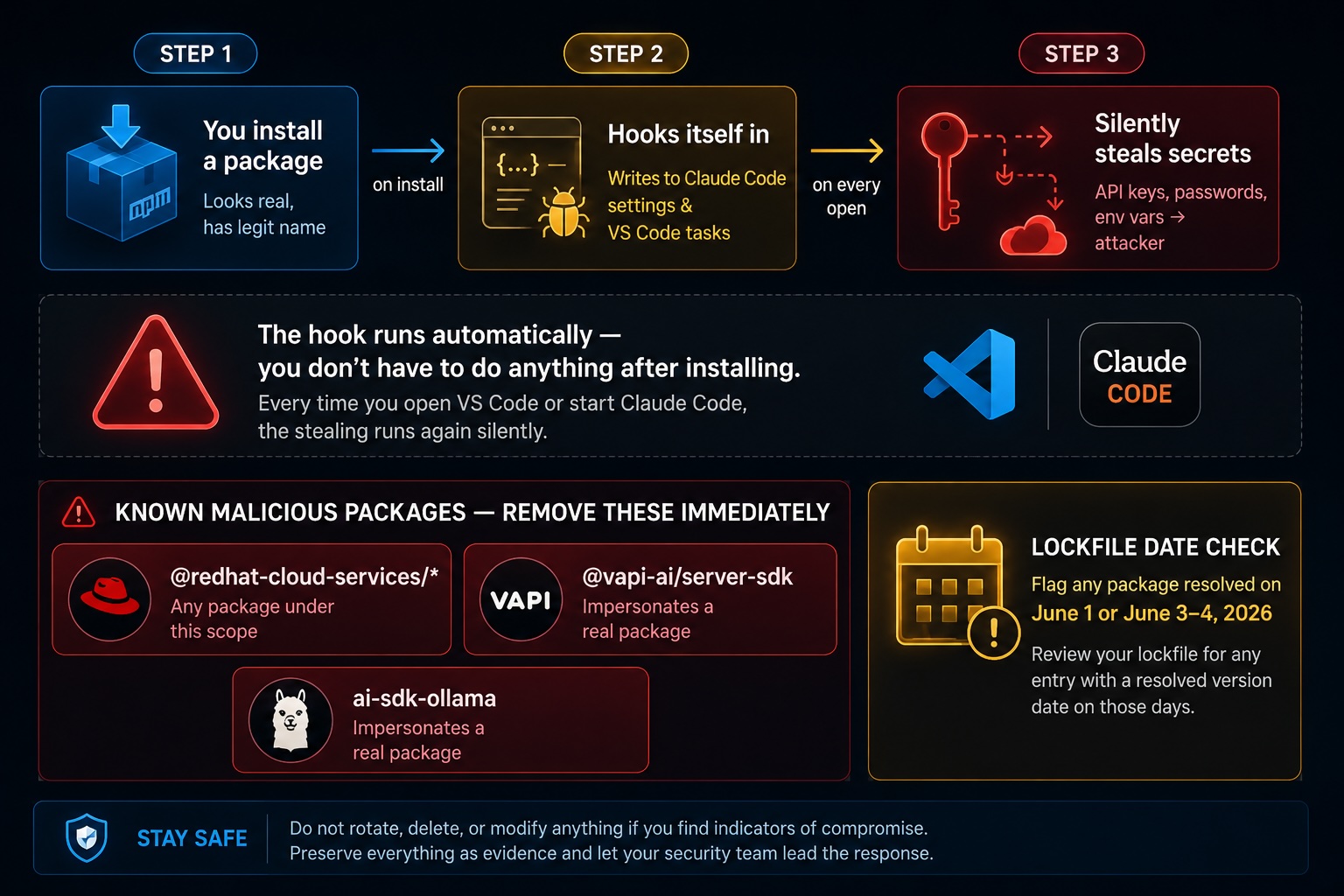
Someone published fake npm packages with convincing names. When you install one, it immediately writes a hidden "run me on startup" instruction into two config files on your machine - one used by Claude Code, one by VS Code. From then on, every time you open a project or start a new session, that code silently sends your API keys, passwords, and environment variables to the attacker's server.
You don't have to do anything wrong. The hook runs automatically and repeatedly, so your credentials keep leaking even after you've moved on.
The attack in three steps: Someone published fake npm packages with convincing names. When you install one, it immediately writes a hidden "run me on startup" instruction into two config files on your machine , one used by Claude Code, one by VS Code. From then on, every time you open a project or start a new session, that code silently sends your API keys, passwords, and environment variables to the attacker's server.
Why it's dangerous: You don't have to do anything wrong. The hook runs automatically and repeatedly, so your credentials keep leaking even after you've moved on.
The lockfile check: If your package-lock.json shows a package was resolved on June 1 or June 3–4, 2026, that's a red flag worth investigating even if the package name looks fine.
What PortlandLabs did and what we're sharing
When this attack surfaced, we wanted to know quickly whether any of our machines were affected. Rather than writing custom scripts or manually grepping through config files, we found a plain-language prompt describing exactly what to check and handed it to Claude. It ran a read-only sweep, reported back clearly, and we had our answer in a few minutes.
We're sharing the prompt here because it took some care to write correctly. We didn't write it ourselves, but we had our CISO Lisa and Korvin review and verify it before we ran it or shared it with anyone else.
What you are about to copy
The instructions below are the original detection sweep used to surface this campaign. They include the exact package names to search for and a PASS / FLAG results table so you know what a clean result looks like versus a compromised one.
Every command is read-only. Each one opens a file or searches for text and prints the result to your terminal. Nothing is written, deleted, modified, or sent anywhere. You can read every line yourself and confirm this before running anything.
Before you run this: This is a detection-only sweep. Do not delete, edit, revoke, rotate, or install anything. Only read files and report. If you find anything suspicious, stop and tell Claude - do not try to clean it up yourself, because this malware wipes the home directory if it detects its access being cut.
Paste the block below into your Claude Code instance in the repos directory you use.
I need you to run a READ-ONLY check on my machine for indicators of the npm "Miasma" / TeamPCP supply-chain attack (surfaced 2026-06-01). This is a detection-only sweep: DO NOT delete, edit, revoke, rotate, or install anything.
Only read files and report. If you find anything suspicious, STOP and tell me — do not try to clean it up yourself, because this malware wipes the home directory if it detects its access being cut.
Check the following and give me a clear PASS/FLAG table at the end:
- AFFECTED PACKAGES — Search every package-lock.json (and package.json) under my repositories directory for any of these names or scopes:
- @redhat-cloud-services (any package in this scope)
- @vapi-ai/server-sdk
- ai-sdk-ollama
Also flag any dependency in a lockfile whose published/resolved version dates to June 1 or June 3-4, 2026, if that's visible.
- CLAUDE PERSISTENCE — Read ~/.claude/settings.json and any .claude/settings*.json in my repos. Flag any "SessionStart" hook or any hook command I'm unlikely to have added (anything invoking curl/wget/node -e/base64/ a remote URL). List every hook you find so I can eyeball it.
- VSCODE PERSISTENCE — Find any .vscode/tasks.json under my repos. Flag any task with "runOn": "folderOpen" or any command that fetches/executes remote code. (If no .vscode/tasks.json files exist at all, that's a PASS.)
- HOME CONFIG — Read ~/.claude.json and confirm it only contains normal Claude Code config (feature flags, MCP servers I recognize) — no injected hooks or shell commands.
Do all of this read-only. End with a summary table: each check = PASS or FLAG, and for any FLAG, paste the exact file path + the suspicious lines verbatim.
If you find something
Stop immediately. Do not delete, rotate credentials, or modify any file.
This malware is reported to monitor for credential revocation and will wipe your home directory if it detects its access being cut off. Contact your security team, preserve all files as evidence, and let them lead the response.
If everything looks clean
No output from the grep and find commands, and no unexpected entries in your settings.json or .claude.json, means no indicators of compromise were found. Continue normal operations, and consider pinning your lockfile and auditing new dependencies before install.
Verify this advisory
Before acting on any advisory - including this one - verify it against the official npm security feed, GitHub Security Advisories, or your organization's security team. Legitimate advisories are traceable to a CVE, an npm advisory number, or a named researcher. If you cannot find an authoritative source, treat the advisory with skepticism.
This document is an informational advisory. Commands shown are read-only detection checks. No tooling is distributed here. Always verify security guidance through official channels before acting on it.
References
- With assistance from PortlandLab team members Korvin and Lisa.
- GitGuardian. (2026). State of secrets sprawl 2026. GitGuardian. https://www.gitguardian.com/state-of-secrets-sprawl-report-2026
- Krebs, B. (2026, May). CISA admin leaked AWS GovCloud keys on GitHub. Krebs on Security. https://krebsonsecurity.com/2026/05/cisa-admin-leaked-aws-govcloud-keys-on-github/
- Microsoft Threat Intelligence. (2026, June 2). Preinstall persistence inside Red Hat npm: Miasma credential-stealing campaign. Microsoft Security Blog. https://www.microsoft.com/en-us/security/blog/2026/06/02/preinstall-persistence-inside-red-hat-npm-miasma-credential-stealing-campaign/
- Snyk. (2026). Miasma: Malicious code in @redhat-cloud-services npm packages. Snyk Security Blog. https://snyk.io/blog/miasma-supply-chain-attack-malicious-code-redhat-cloud-services-npm-packages/
- StepSecurity. (2026). Binding-gyp npm supply-chain attack spreads like worm. StepSecurity Blog. https://www.stepsecurity.io/blog/binding-gyp-npm-supply-chain-attack-spreads-like-worm
- Tenable. (2026). Mini Shai Hulud: Frequently asked questions. Tenable Blog. https://www.tenable.com/blog/mini-shai-hulud-frequently-asked-questions
- Wiz Research. (2026). Miasma supply-chain attack targeting Red Hat npm packages. Wiz. https://www.wiz.io/blog/miasma-supply-chain-attack-targeting-redhat-npm-packages
- Reddit. (2026, June 1). An active attack is planting backdoors inside Claude Code [Reddit post]. r/ClaudeAI. https://www.reddit.com/r/ClaudeAI/comments/1u05t5e/an_active_attack_is_planting_backdoors_inside/