
Every intranet has a graveyard. It's the section no one visits, full of pages that were accurate in 2021, linked to a tool that no longer exists, and last updated by someone who left the company eighteen months ago. Most organizations know it's there. Almost none have a reliable process for finding it before an employee does.
AI won't fix a neglected intranet on its own. But it can do the tedious diagnostic work that nobody wants to do manually: reading hundreds of pages, flagging inconsistencies, identifying content that references outdated policies, and surfacing pages that haven't been touched in long enough that they probably should be. That's the job this post is about.
Why intranet content goes stale faster than you think
Public websites have natural forcing functions for freshness. Someone notices an outdated price on the homepage. A customer complains about a broken link. An SEO audit surfaces pages with thin content. Intranets have none of that external pressure. The only people noticing stale content are the employees who need it to be accurate, and most of them will quietly work around it rather than report it.
The problem compounds over time. A benefits page from 2022 might still be technically correct for most employees but wrong for anyone hired after a plan change. An onboarding document might reference a tool the company stopped using. An HR policy page might contradict a more recent update buried in a different section. None of these are catastrophic individually. Together, across hundreds of pages, they erode trust in the intranet as a source of truth.
That erosion is the real cost. Once employees stop trusting the intranet to be accurate, they stop using it, and you're back to tribal knowledge and Teams messages as your primary internal communication channels. If you're still building the case for why that matters, our guide to what an intranet actually is covers the fundamentals.
What AI can actually do here
It helps to be specific about what AI is and isn't good at in a content audit context, because the honest answer is more useful than a general claim that AI can do everything.
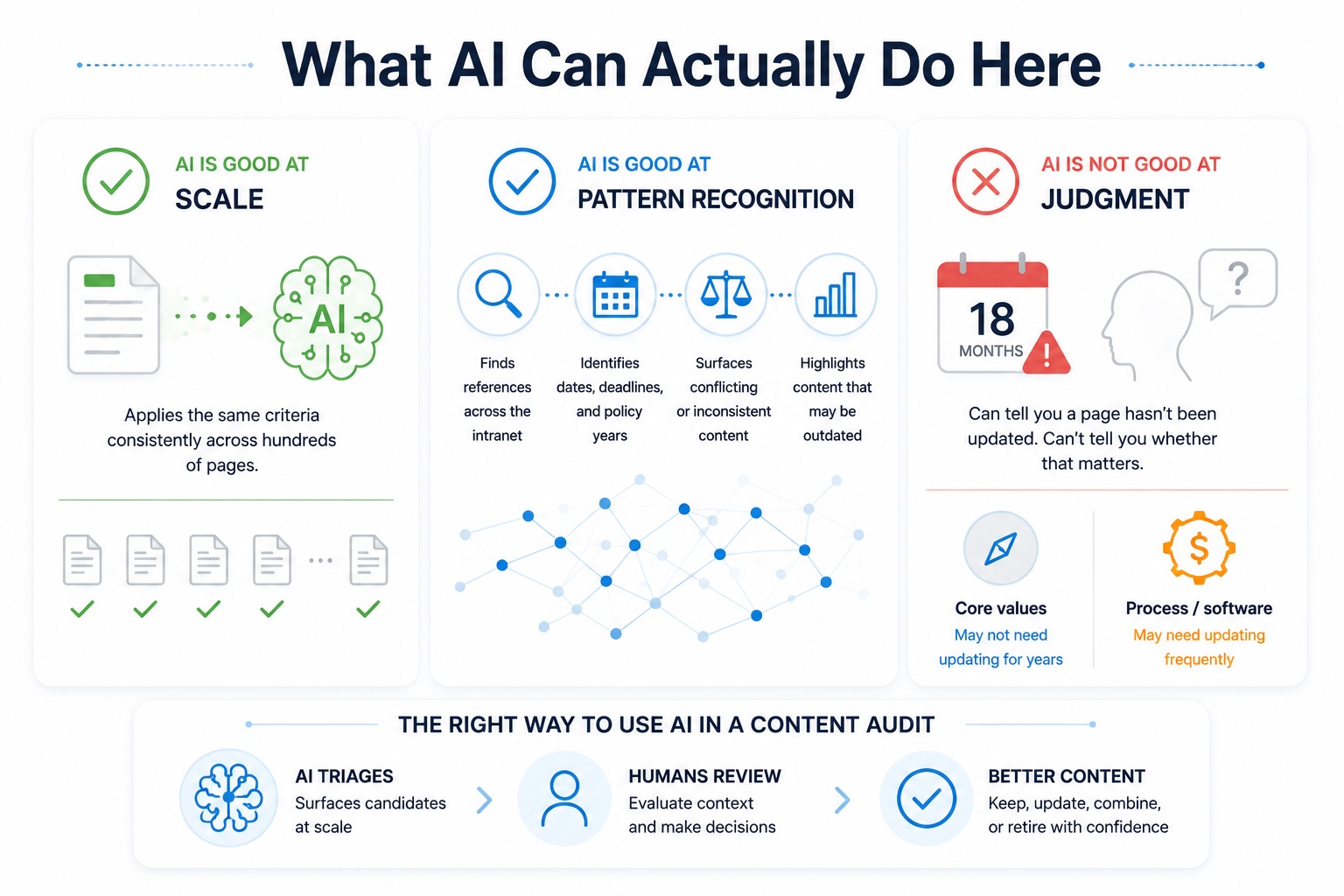
AI is good at scale. A human content auditor reviewing 400 intranet pages is going to get tired, lose consistency, and miss things. An AI tool reviewing 400 pages applies the same criteria to page 400 that it applied to page one. For large intranets, this alone justifies the process.
AI is good at pattern recognition. It can flag pages that reference a specific software tool across the whole intranet, so you can check whether those references are still accurate after a platform migration. It can identify pages that mention specific dates, deadlines, or policy years that may now be outdated. It can surface content that contradicts other content on the same topic.
AI is not good at judgment. It can tell you a page hasn't been updated in 18 months. It can't tell you whether that matters. A page explaining the company's core values might not need updating for five years. A page explaining how to submit a reimbursement request might need updating every time the finance software changes. That judgment still belongs to a human.
The right way to use AI in a content audit is as a triage tool, not a replacement for editorial review. It surfaces candidates for human attention. Humans make the calls.
A practical starting point: three prompts worth running
If you have access to a general-purpose AI tool like ChatGPT or Claude, you can start a basic content audit without any specialized software. The process isn't glamorous but it works.
The date-reference sweep. Export your intranet content to a readable format and ask the AI to identify any pages that reference specific years, dates, or time-bound events. Anything referencing 2021 or 2022 as current or recent is an immediate flag for review. This finds the obvious stuff fast.
The tool and system reference check. If you've migrated platforms, rebranded tools, or changed software in the past two years, ask the AI to find every page that mentions the old tool names. You'll often find onboarding docs, training guides, and process pages that still walk employees through workflows that no longer exist.
The contradiction check. Feed the AI your HR or policy sections and ask it to identify any pages that appear to contradict each other on the same topic. Benefits eligibility is a common place for this. So are approval processes, which tend to get updated in one place without anyone remembering to update the supporting documentation.
None of these require an enterprise content intelligence platform. They require a text export and a willingness to spend an afternoon on it. The output is a prioritized list of pages to review, not a finished audit.
Building it into a recurring process
A one-time audit is better than nothing, but it doesn't solve the underlying problem. Intranet content goes stale continuously, which means the review process has to be continuous too.
The most sustainable approach is to build content ownership and review cycles into your intranet governance model before staleness accumulates. Every page should have an owner. Every owner should have a review reminder at a defined interval, typically quarterly for high-traffic pages like HR policies and onboarding, annually for reference content that changes less frequently. AI-assisted audits work best as a checkpoint between those cycles, catching drift that slipped through rather than as the primary governance mechanism.
This is also where your CMS matters. An intranet built on a platform with strong permissions and workflow means content owners can be assigned at the page level, review reminders can be tied to publishing workflows, and the audit trail of who reviewed what and when is part of the system rather than a separate spreadsheet. If you're currently managing content freshness through a shared Google Sheet and optimism, that's the structural problem the AI audit will keep bumping into.
A prompt template you can use today
If you want to run the date-reference sweep or contradiction check right now, here's a prompt structure that works reliably with ChatGPT, Claude, or Gemini. Paste your exported page content after the prompt, or upload it as a document if your AI tool supports file uploads.
You are reviewing intranet content for a mid-sized organization. Your job is to identify content that may be stale, inaccurate, or in need of review. For each page I provide, flag any of the following:
- References to specific years, dates, or deadlines that may now be outdated
- Named software tools, platforms, or systems that may have been replaced or renamed
- Policy language that conflicts with other pages on the same topic
- Instructions that reference roles, departments, or processes that may no longer exist
- Any content that appears to assume a pre-2023 workplace context (fully in-office, specific legacy systems, pre-pandemic processes)
For each flag, note the page title, the specific text that triggered the flag, and the reason for review. Do not rewrite the content. Only identify what needs human attention.
A few things that make this work better in practice: export your content section by section rather than dumping everything at once, since AI tools have context limits and the quality of the output drops when you push too much in at once. Run HR and onboarding content first since those tend to have the highest density of time-sensitive references. And keep the AI's output as a list for a human reviewer to action, not as the final word on what gets updated.
If you want to see how this process works on a real intranet before committing to a build, start a free Concrete trial and you'll have a working intranet environment to audit within minutes.
Using your analytics data before you use AI
Before running any AI audit, there's a faster signal hiding in your analytics that most intranet managers overlook: what employees are searching for and not finding. Analytics data tells you where the pain is right now. The AI audit tells you what's quietly drifting out of date. Run them in that order and you'll prioritize correctly.
If your intranet uses Matomo for analytics, you have access to several reports that are specifically useful for a content audit. We've written about why we use Matomo ourselves and what makes it a good fit for intranet environments in particular. Data ownership, GDPR compliance, and no third-party sharing matter when the data you're collecting is employee behavior on internal systems.
Here's what to pull and what to look for in each report.
Site Search: Keywords With No Results
This is the single most actionable report available for an intranet content audit. Find it under Behaviour > Site Search > Search Keywords with No Results. Run it over a 90-day window and sort by frequency.
Every row in this report is an employee who needed something and couldn't find it. The volume tells you how urgent the gap is. Anything appearing more than 20 times in a quarter should be treated as a priority content action before you touch anything else in the audit.
What the data typically shows: a mix of content that exists but is poorly titled, content that used to exist and was removed, and genuine gaps where the intranet has never covered the topic. These three causes have different fixes. A title mismatch gets resolved with a rename or added search keywords. Removed content needs to be recreated or redirected. A genuine gap is your highest-priority new content brief, built entirely from real employee behavior.
Site Search: All Keywords
Beyond zero-result searches, the full keyword report (Behaviour > Site Search > Site Search Keywords) shows you what employees search for most overall. High-volume searches for content that does return results are worth reviewing too. If 200 employees searched "parental leave" and landed on a page that's 18 months out of date, the search worked but the content didn't. This is where you cross-reference the search data against your inventory's Last Updated column.
Pages Report
Behaviour > Pages shows visits, time on page, and bounce rate for every page on the intranet. For a content audit, the combinations matter more than any single metric:
High visits, high bounce rate. Employees are finding the page but leaving immediately. Usually means the content doesn't match what they were looking for, the page is outdated and they can tell, or the page structure makes it hard to find the answer. This is your most urgent update queue.
High visits, low time on page. Employees are finding what they need quickly, which is good, or scanning and leaving because the content is too thin, which is bad. Look at the actual page to tell which one it is.
Zero or near-zero visits on a page that should be in regular use. An onboarding page nobody visits is a findability problem. A benefits page nobody visits during open enrollment is a crisis. Both need investigation, but for different reasons.
Pages that haven't been visited in 90 days. Not automatically stale, but worth flagging for review alongside the Last Updated data. A page that hasn't been visited or updated in over a year is a strong candidate for archiving or removal.
Transitions Report
Matomo's Transitions report (right-click any page in the Pages report and select Transitions) shows where employees came from before landing on a page and where they went after. This is useful for understanding whether your intranet navigation is working or whether employees are having to search for things they should be able to find through browsing. If most traffic to your benefits page is coming from the search bar rather than the HR hub navigation, that's a structural findability problem, not a content problem.
Putting it together
The order of operations for an analytics-first audit: start with zero-result searches to find immediate gaps, cross-reference the full keyword report against your inventory's last-updated dates to find high-traffic stale content, then use the pages report to identify low-traffic pages that might be candidates for consolidation or removal. Run the AI prompt against the content that surfaces from this process rather than against your entire content library at once. You'll get better results and spend less time reviewing false positives.
What a stale content report should actually look like
Once you've run the AI sweep and pulled your Matomo search data, you need somewhere to put the findings. A stale content report doesn't have to be complicated. It needs to answer four questions for every page under review: what is it, who owns it, when was it last touched, and who touched it. Everything else is noise.
Here's the structure we recommend. You can build this in a spreadsheet and share it with content owners, or maintain it as a page inside the intranet itself so it's visible to everyone responsible for keeping content current.
Content Inventory
| Name | Owned By | Last Updated | Last Updated By | Status | Action Required |
|---|---|---|---|---|---|
| Benefits Overview 2022 | jsmith | 14 months ago | jsmith | Stale | Review and update. References old plan year. |
| IT Onboarding Checklist | mwilliams | 6 months ago | hradmin | Review | References legacy VPN tool. Confirm still accurate. |
| Remote Work Policy | hradmin | 3 months ago | hradmin | Current | None |
| Office Locations | Unassigned | 26 months ago | admin | Stale | No owner assigned. Reassign and review immediately. |
| Expense Reimbursement Process | fgarcia | 18 months ago | fgarcia | Stale | References Concur. Confirm platform still in use. |
The Status column should use a simple three-tier system: Current (reviewed within your defined cycle), Review (approaching the threshold or flagged by the AI sweep), and Stale (past threshold or flagged for specific outdated references). Keep the Action Required column human-readable. Whoever picks this up three months from now needs to know why it was flagged, not just that it was.
The unassigned owner row is worth calling out specifically. Pages with no assigned owner are your highest-risk content. They don't have a natural reviewer, they don't get caught in workflow reminders, and they tend to be the oldest content on the site. Any audit should surface these immediately and treat reassignment as the first action, before any content review happens.
User Activity Report
Content can be technically current but functionally ignored. The user activity layer of your audit tells you which pages employees are actually visiting, which ones they're landing on and immediately leaving, and which ones they've stopped visiting entirely. Cross-reference this against your inventory to prioritize: a stale page with high traffic is urgent, a stale page nobody visits is lower priority unless it's policy-critical.
| Page | Visits (90 days) | Avg. Time on Page | Bounce Rate | Last Visit | Priority |
|---|---|---|---|---|---|
| Benefits Overview 2022 | 847 | 1m 12s | 72% | Yesterday | High. Stale and heavily used. |
| IT Onboarding Checklist | 312 | 3m 44s | 31% | 3 days ago | High. High engagement, needs accuracy check. |
| Office Locations | 23 | 0m 18s | 91% | 2 weeks ago | Medium. Low traffic but high bounce suggests confusion. |
| Expense Reimbursement Process | 0 | n/a | n/a | Never recorded | Low. Orphaned page. Assess whether to keep or remove. |
In Matomo, this data lives under Behaviour > Pages. Filter to your intranet section and sort by visits over a 90-day window. A high bounce rate on a policy page is a warning sign: employees are finding it, not getting what they need, and leaving. That's usually a content accuracy problem, a title mismatch, or a page that's been superseded by something else but not removed.
Search Without Results Report
This is the most actionable report in the whole audit. Every row is a direct signal from an employee that something is missing or broken.
| Search Term | Searches (90 days) | Results Returned | Likely Cause | Action |
|---|---|---|---|---|
| reimbursement form | 94 | 0 | Page titled "Expense Reimbursement Process". Title mismatch. | Add search keywords or rename page |
| parental leave policy | 67 | 0 | Content does not exist on intranet | Create page. High demand confirmed. |
| VPN setup | 43 | 0 | Old VPN page removed after platform migration | Create updated page for new platform |
| org chart | 38 | 0 | Org chart exists as embedded image, not indexed by search | Convert to structured page or add text content |
| holiday schedule 2024 | 29 | 0 | 2024 page removed. 2025 version not yet published. | Publish current year page and set annual reminder |
Pull this from Matomo under Behaviour > Site Search > Search Keywords with No Results. Run it over 90 days and sort by frequency. Anything appearing more than 20 times in a quarter is a content gap worth prioritizing above almost anything else in the audit, because real employees are actively failing to find it right now.
The org chart row is a common one worth flagging. A lot of intranet teams embed org charts as images or PDFs, which means intranet search can't index them. Adding a short text description and relevant keywords to the page that hosts the org chart is usually enough to make it findable without rebuilding it entirely.
Concrete's permissions model means you can assign content ownership at a granular level without giving every department head admin access to the whole site. A page-level owner gets edit rights to their section, sees their content in a workflow queue, and can be prompted for review on a schedule. The audit trail is built in.
Combined with an AI-assisted sweep of your content inventory, you get a process that's actually maintainable: AI surfaces what needs attention, your workflow routes it to the right person, and the permissions model makes sure only reviewed, approved content reaches employees.
If your intranet is running on something that can't support that kind of governance structure, the AI audit will tell you what's stale. It won't give you a way to keep it fresh. That part is a platform problem as much as a process problem.
Want to see how it works? Start a free trial and have a working intranet up in minutes, or schedule a demo and we'll walk through your specific requirements.