
A website's permissions are mostly about who can edit a page. An intranet's permissions are about who can see that the page exists in the first place. That distinction sounds small until you're the person who accidentally published next quarter's layoff list to the entire company instead of just the leadership team.
If you've only ever built or managed a marketing website, this difference can sneak up on you. Most CMS permission systems are built around a simple question: can this person edit content? Intranets need to answer a harder one: should this person even know this content exists?
The gap between having an intranet and having one that actually works is wider than most organizations admit. 91% of organizations say they have an intranet, but 55% rely on fragmented systems that don't function as a coherent whole.1 Separately, earlier survey data found 57% of employees saw no purpose in their company intranet, and 72% rated their intranet tools as fair to poor.1 A fragmented permissions setup is one of the most common reasons a well-intentioned intranet quietly stops being used.
Why website permissions and intranet permissions solve different problems
On a typical website, permissions exist to protect the editing process, not the content itself. You don't want an intern accidentally deleting the homepage, so you give them contributor access instead of admin. If someone outside that small circle happens to see a draft blog post before it's published, it's mildly embarrassing at worst.
An intranet flips that risk entirely. The content itself is often the sensitive part: HR documents, department budgets, an internal memo about a reorg that hasn't been announced yet, a benefits page that should only be visible to full-time staff. Visibility is the control, not editing rights. Get this wrong and you're not dealing with an awkward typo, you're dealing with an HR complaint or a confused all-hands meeting where half the room already saw the announcement and the other half didn't.
Most organizations don't learn this distinction until something slips through. It's one of those problems that's invisible until the day it very much isn't.
The four things a real intranet permissions model needs to handle
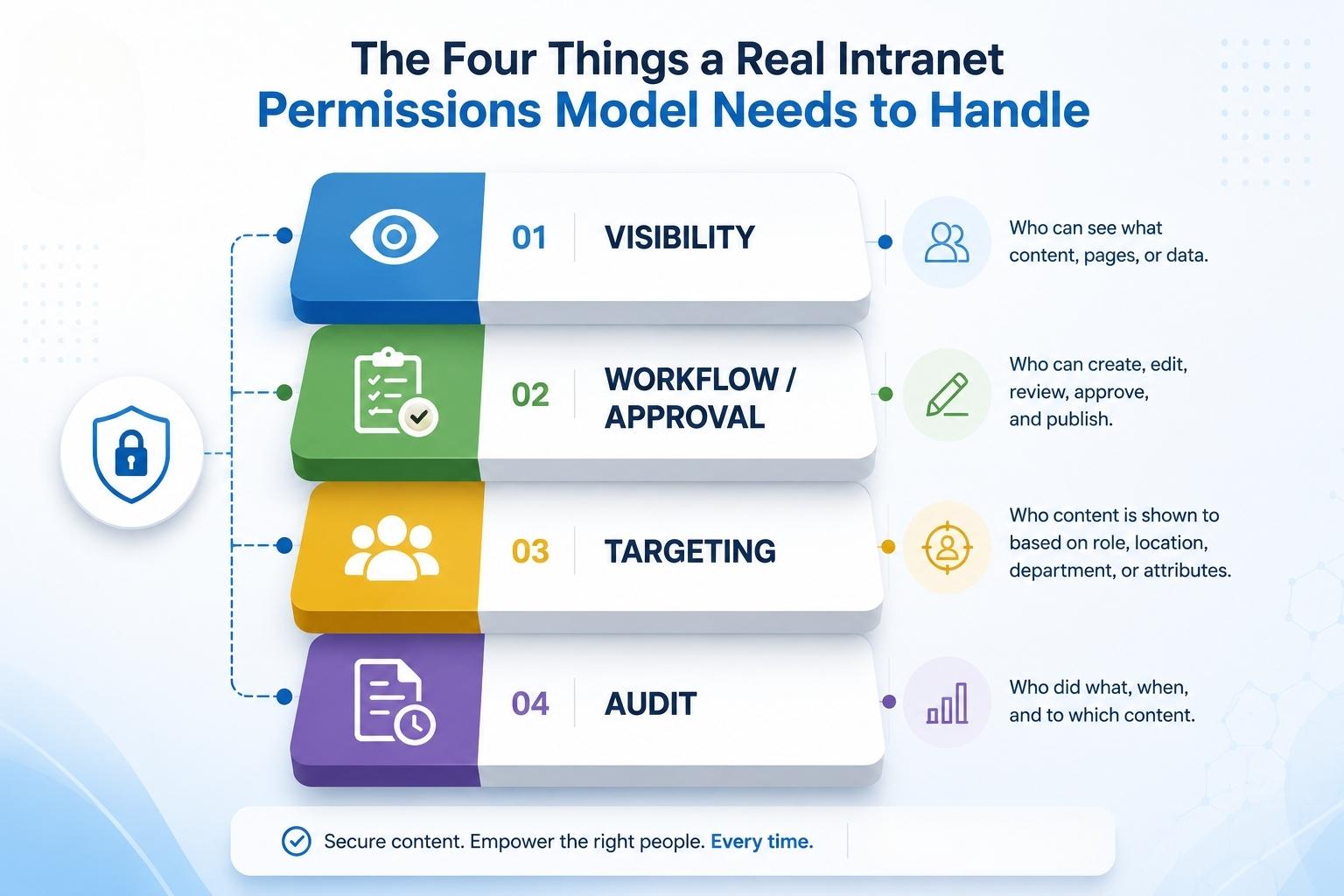
Role-based visibility. Who can see a given page or section at all, based on department, title, location, or employment type. This is the layer that decides whether the finance team's budget tracker even shows up in someone's navigation, not just whether they can edit it.
Workflow and approval. Who can draft content, who can approve it, and who can publish it live. On a small marketing site this might be one person wearing all three hats. On an intranet with contributors across HR, comms, IT, and half a dozen department heads, you need a real approval chain or things get messy fast.
Content targeting and personalization. The HR hub should show up for HR. The engineering wiki shouldn't clutter everyone else's homepage. Good intranet software handles this without someone manually managing access lists every time a new hire starts.
Audit and accountability. Who changed what, when, and who approved it. This sounds like a nice-to-have until a compliance review asks for it, at which point it's the only thing that matters.
Where this matters most: HR, comms, and compliance-heavy teams
If you're running internal communications or managing an HR resource hub, this isn't a hypothetical concern. It's the daily reality of who gets to see what. We've written before about why SharePoint isn't enough for internal communications, and permissions complexity is a big part of that story. A lot of platforms can technically restrict access, but actually managing it at scale, across departments, locations, and contractor types, is where things start to break down.
This is also where the broader intranet conversation tends to get more serious. An intranet isn't just an internal-facing website with a different color scheme. It's infrastructure that has to hold up under real organizational complexity, and permissions are usually the first place that complexity shows up.
How Concrete CMS handles this out of the box
This is one of the areas where we don't have to oversell anything, because it's just true: permissions, workflow, and content targeting ship in Concrete's core. You're not stitching together three different plugins from three different vendors to get role-based visibility, an approval chain, and an audit trail. It's there from the start.
That matters even more once compliance enters the picture. The same permissions and workflow model that lets an HR team manage a benefits hub is what supports clients like the U.S. Army MWR, where hundreds of editors across different installations need carefully scoped access, and nothing gets published without the right approvals. Permissions aren't a separate compliance feature bolted on top. They're the same system doing double duty.
Getting started without overbuilding it
None of this means you need every permission tier configured on day one. Most teams start with basic role separation (HR sees HR, IT sees IT, leadership sees everything) and add granularity as the organization grows or as compliance needs get more specific. Overbuilding a permissions model before you actually need it just means more configuration to maintain and more places for things to quietly break.
Start simple, get the visibility layer right first, and let the workflow and audit pieces grow alongside your team.
Want to see how the permissions model actually works in practice? Schedule a demo and we'll walk through it.
References
- Simpplr. (2024, August). The intranet illusion: Simpplr report finds many organizations are still failing at internal comms [Press release]. PR Newswire. https://www.prnewswire.com/news-releases/302521180.html