
Most organizations don't choose their internal communication tools so much as accumulate them. Someone on the team starts using Slack. IT sets up a shared drive. HR sends policy updates by email. Leadership records all-hands videos on a platform nobody checks. Before long, information is scattered across a dozen places and employees spend more time figuring out where to look than actually getting things done.
Getting the stack right starts with understanding what's actually available. Internal communication tools span a wider range than most people realize, from instant messaging platforms and intranet portals to two-way radios and facility-wide PA systems. This guide covers the main categories, what each one is genuinely good for, and how to think about building a communications stack that fits your organization rather than fighting it.
What Are Internal Communication Tools?
Internal communication tools are the hardware and software an organization uses to connect its people and share information. That definition covers a lot of ground. At one end you have a walkie-talkie in a warehouse. At the other end you have an enterprise intranet serving 100,000 employees across 80 countries. Both are internal communication tools in the same sense that a bicycle and a 747 are both transportation.
The category matters because different tools solve different problems. Instant messaging is excellent for quick, project-based conversation and terrible for official policy communication. Email is fine for formal announcements and nearly useless for real-time collaboration. A public address system can reach every person in a building in seconds and can't do anything else. Knowing what each tool is designed for is the first step to using the right ones.
Why the Right Tools Matter
Poor internal communication has measurable consequences. Organizations with highly effective internal communication are 3.5 times more likely to outperform their competitors. The flip side is equally concrete: employees spend an average of 3.2 hours per week searching for information they can't easily find, and fragmented communications tools are one of the primary reasons why.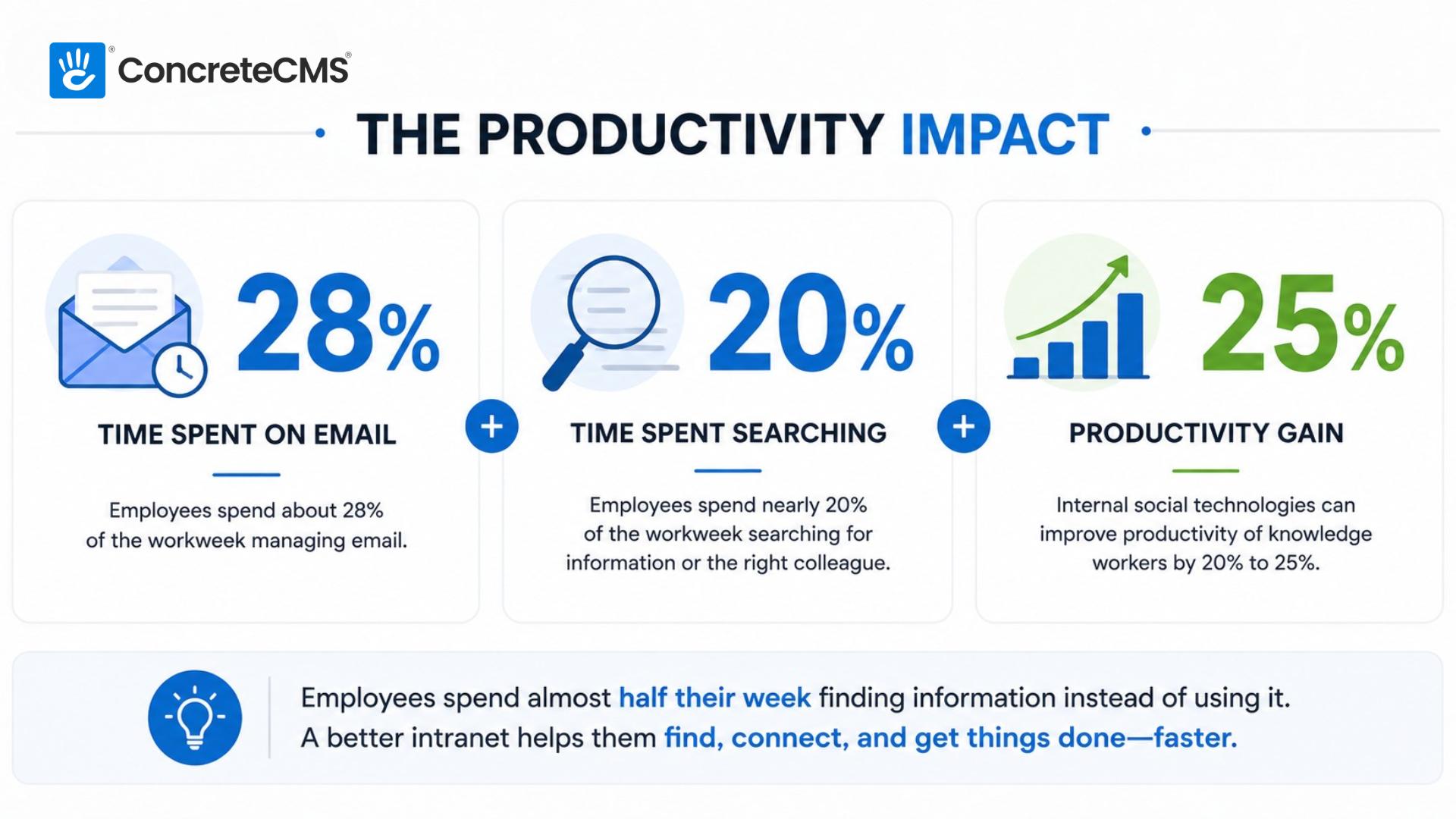
Organizations with effective internal communications are 3.5x more likely to outperform their competitors. The tools don't create good communication on their own, but the wrong tools make good communication nearly impossible.
The challenge isn't usually a shortage of tools. Most organizations have too many, not too few. The problem is that the tools weren't chosen with a coherent strategy in mind, so they don't work together. Employees get important announcements in three different places and stop paying attention to any of them. That's a tool problem, not a people problem.
Types of Internal Communication Tools
There are four broad categories: hardware and mobile devices, desktop and office systems, software applications, and facility and emergency broadcast systems. Most organizations use a mix across all four, weighted toward whatever their workforce actually looks like. A distributed knowledge-work company will lean heavily on software. A hospital will depend on both software and specialized hardware. A manufacturing plant might run all four in parallel.
Hardware and Mobile Devices
Smartphones and Mobile Phones
The most universal internal communication device most organizations already have. Smartphones give employees access to corporate apps, messaging platforms, email, and video conferencing from anywhere with a signal. In organizations with a distributed or field-based workforce, mobile devices are often the primary communication tool rather than a secondary one.
Best for: Any workforce that isn't desk-bound. Remote teams, field staff, sales teams, and service organizations where employees need access to information and colleagues without being tied to a desk. Field Communication
Two-Way Radios and Walkie-Talkies
Instant, reliable, one-to-many communication that doesn't depend on cellular coverage or internet connectivity. Two-way radios are the backbone of internal communication in construction, warehousing, healthcare, hospitality, and event management for exactly that reason. When a network goes down or a team is working in a basement or a rural site, radios keep communication running. They're also faster than any app for time-critical field communication where there's no time to unlock a phone and open a chat window.
Best for: Environments where cellular or WiFi coverage is unreliable, where hands-free operation matters, or where speed of communication is more important than a written record. Wearable
Headsets and Wearables
Earpieces, headsets, and smartwatches allow hands-free communication for staff who can't stop what they're doing to check a device. Retail, hospitality, and security are the primary use cases. A floor manager at a retail store can stay connected to the back office without interrupting a customer interaction. A nurse can receive a communication without stepping away from a patient.
Best for: Customer-facing roles, clinical environments, and any context where employees need to stay connected while keeping their hands and attention on the task in front of them.
Desktop and Office Systems
Laptops and Desktop Computers
The primary hub for knowledge workers accessing internal software, email, shared drives, and collaboration platforms. For desk-based employees, the computer is the access point for almost every other tool in the stack. The hardware itself isn't the communication tool so much as the gateway to all the software tools that are.
Best for: Knowledge workers, administrative staff, and anyone whose primary work involves creating, reviewing, or managing information.
VoIP Desk Phones
Internet-based office phones used for direct internal extension dialing, conference calls, and formal voice communication. VoIP systems have largely replaced traditional PBX phone infrastructure and can be managed centrally without on-site hardware. For organizations that still rely on direct-dial internal numbers, a VoIP system offers the same functionality at lower cost with more flexibility.
Best for: Organizations that handle high volumes of internal and external calls, particularly in finance, legal, healthcare, and customer service environments where a formal voice channel matters. Meeting
Video Conferencing Hardware
Dedicated conference room equipment, camera setups, and desk peripherals for virtual meetings. As hybrid work has become standard, the quality of video conferencing hardware has become a real differentiator in how well distributed teams collaborate. A meeting room with a poor camera and no room microphone forces remote participants into a second-class experience that quietly damages team cohesion over time.
Best for: Organizations running hybrid or distributed teams where face-to-face meeting quality affects collaboration, decision-making, and team culture.
Software Applications
Software tools are the fastest-growing and most varied category. They range from simple chat apps to full enterprise platforms, and the overlap between them can make it hard to know what you actually need. The key is matching the tool to the communication type rather than trying to do everything in one place.
Instant Messaging and Chat Platforms
Slack, Microsoft Teams, and similar platforms handle the quick, informal, project-based conversation that used to happen in person. They're excellent for real time collaboration, reducing the volume of internal email, and keeping project threads organized in channels rather than buried in inboxes. They integrate with most project management and productivity tools, which makes them a natural communications hub for knowledge workers.
The limitation is just as important to understand: chat platforms are terrible for official communication. A policy update posted in a Slack channel will be missed by half the team and impossible to find a month later. Chat is for conversation, not for the institutional record.
Best for: Day-to-day team communication, project coordination, and quick questions that don't warrant an email. Not a substitute for a proper internal communications platform when it comes to official announcements or company-wide messaging. Platform
Intranet Portals
The piece most organizations are missing. An intranet is a centralized internal website where company news lives, HR policies are published, the employee directory is maintained, and official information is findable. Unlike chat platforms where content disappears into a feed, an intranet is structured and searchable. Unlike email, it doesn't require employees to have received a specific message to access current information.
A well-maintained intranet is the source of truth for your organization. It's where employees go to find out what the current policy actually is, who to contact about something, and what's happening across the company. Organizations running BASF's internal communications on Concrete CMS, for example, saw a direct improvement in content freshness simply because the editing experience was easy enough that authors actually kept things current.
For organizations in compliance-heavy industries, the intranet also serves a governance function. Policy documents are versioned, access is controlled, and there's a clear record of what information was available when.
Best for: Any organization that needs a reliable source of truth for official information, HR resources, company news, and employee self-service. Particularly valuable for distributed teams, compliance-driven industries, and organizations with more than a few dozen employees. Email
Still the backbone of formal internal communication despite its limitations. Email is universal, asynchronous, searchable, and creates a written record. For official announcements, external-facing communication, and anything that needs a paper trail, email remains the right tool. The problem is that many organizations use it for everything, including the quick conversational exchanges that should live in a chat platform and the policy information that should live in an intranet. When email handles all three, it handles none of them well.
Best for: Formal announcements, external communication, and situations where a written record and universal access matter. Not ideal for real time collaboration, project coordination, or institutional knowledge management. Video
Video Conferencing Platforms
Zoom, Microsoft Teams, and Google Meet handle synchronous video meetings and increasingly async video messaging as well. These platforms have become essential infrastructure for distributed and hybrid teams, replacing both the in-person meeting and a significant chunk of phone calls. The async video format, where someone records a short walkthrough or update rather than scheduling a meeting, has meaningfully reduced meeting volume in organizations that have adopted it.
Best for: Remote and hybrid teams, complex discussions that benefit from face-to-face interaction, training and onboarding, and leadership communications where presence and tone matter. Productivity
Project Management Tools
Asana, Jira, Monday, and similar platforms embed communication directly into task tracking. Rather than discussing a project in a chat channel disconnected from the actual work, project management tools keep conversation, status updates, and decisions attached to the tasks they relate to. This makes the project history searchable and significantly reduces the "what did we decide about X?" problem that plagues organizations relying on chat alone.
Best for: Teams running multiple concurrent projects, development teams, and any organization where the connection between communication and task status matters for accountability and visibility.
Facility and Emergency Broadcast Systems
This category gets overlooked by organizations that think of internal communications primarily in terms of software. For manufacturing, healthcare, education, and any environment where not everyone is at a desk, facility-wide broadcast systems are essential infrastructure.
Signage
Digital Signage
Screens and displays placed in break rooms, production floors, cafeterias, and high-traffic areas can broadcast company metrics, safety information, announcements, and real-time operational data to employees who aren't at a desk. For manufacturing and logistics operations, digital signage showing live production metrics is a direct operational tool. For office environments, it's a way to reach employees who might miss an email or miss the intranet announcement.
Best for: Environments with a significant deskless workforce, high-traffic common areas, and situations where real-time operational data needs to be visible to a whole team simultaneously. Emergency
PA Systems and Intercoms
Hardwired public address and intercom systems are used for building-wide announcements, safety drills, and emergency alerts. They remain the most reliable broadcast tool in environments where every person in a building needs to receive a message immediately, regardless of what device they're carrying or what platform they're logged into. Hospitals, schools, and large manufacturing facilities rely on PA systems as a critical safety tool that no software platform fully replaces.
Best for: Emergency communication, safety-critical environments, and any situation where guaranteed delivery to everyone in a physical space is more important than channel flexibility.
How the Tools Compare
| Tool Type | Best Use Case | Works Offline | Searchable Record | Reaches Deskless Workers |
|---|---|---|---|---|
| Smartphones | Anywhere access to apps and messaging | Partial | Via apps | Yes |
| Two-Way Radios | Field and facility real-time comms | Yes | No | Yes |
| Instant Messaging | Day-to-day team conversation | No | Limited | Via mobile |
| Intranet Portal | Official information and company news | No | Yes | Via mobile |
| Formal announcements and records | No | Yes | Via mobile | |
| Video Conferencing | Meetings and async updates | No | Via recording | Via mobile |
| Project Management | Task-linked communication | No | Yes | Via mobile |
| Digital Signage | Broadcast in physical spaces | Yes | No | Yes |
| PA / Intercom | Emergency and building-wide alerts | Yes | No | Yes |
How to Choose the Right Mix for Your Organization
There is no single right answer, but there are good questions to ask. Start with your workforce rather than your tool preferences. Where are your employees? What devices do they have reliable access to? What is the primary communication failure you are actually trying to solve?
A fully remote knowledge-work organization needs strong software infrastructure: a reliable chat platform, a video conferencing setup that doesn't frustrate people, and an intranet that gives everyone access to the same current information regardless of time zone. Hardware beyond laptops and headsets is largely irrelevant.
A hybrid manufacturer with a mix of office staff, production floor workers, and remote managers needs all four categories. Software handles the office and remote workers. Two-way radios and digital signage cover the production floor. PA systems handle emergencies. The intranet is the one place where everyone, across all of those environments, can find official information.
The most common mistake is adding tools to solve problems rather than removing the tools that are creating them. If employees aren't reading company announcements, the answer is rarely a new tool. It's usually that the announcements are going out in a channel nobody trusts, or in a format that's easy to miss. Fix the channel and the content before adding to the stack.
How an Intranet Ties It All Together
Most organizations have messaging and email covered. The piece that's most consistently missing is a central source of truth: a place where official information lives, policies are current, the employee directory is accurate, and employees know they can trust what they find there.
That's what an intranet does that no other tool in the stack does. Chat platforms are for conversation, not for institutional memory. Email inboxes are personal and unsearchable by anyone else. Project management tools are project-scoped. None of them give every employee in the organization access to the same authoritative, up-to-date information.
An intranet fills that gap. When it's well-maintained, it reduces the volume of "where do I find X?" messages in Slack, the number of emails asking HR the same question, and the amount of time employees spend figuring out who to contact about something. It makes every other tool in your communications stack work better by giving employees a reliable home base.
For organizations that have tried and failed to maintain an intranet before, the editing experience is usually where things fell apart. When updating the intranet requires IT involvement or navigating a complex backend, it doesn't get updated. Concrete CMS was built around in-context editing from the start editors see exactly what employees see, click what they want to change, and publish. That friction reduction is what keeps an intranet current rather than becoming another ghost town.
The right internal communication tools don't create good communication on their own. But the wrong tools, or too many tools pointing in different directions, make good communication nearly impossible. Start with what your workforce actually looks like, match the tool to the communication type, and make sure you have one reliable source of truth that everyone can find and trust.
If that last piece is what's missing, we'd be happy to show you what a well-built intranet looks like in practice.
FAQ
What is the most commonly used internal communication tool?
Email remains the most universally used internal communication tool across organization types and industries. Instant messaging platforms like Slack and Microsoft Teams have overtaken email for day-to-day team conversation in knowledge-work organizations, but email is still the default for formal announcements, external-facing communication, and anything that requires a written record.
What is the difference between internal and external communication tools?
Internal communication tools are designed for communication within an organization — between employees, teams, and departments. External communication tools handle communication with customers, partners, vendors, and the public. Many tools, like email and video conferencing, serve both purposes. The key difference is usually access control: internal tools are restricted to authenticated employees, while external tools are accessible to anyone the organization chooses to communicate with.
What tools do large organizations use for internal communications?
Large organizations typically run a layered stack: an intranet for official information and company news, a chat platform like Slack or Microsoft Teams for day-to-day conversation, email for formal communication, video conferencing for meetings, and project management tools for task-linked communication. Organizations with a significant deskless workforce also rely on digital signage, two-way radios, and PA systems that software-first companies often overlook.
Is email still a good internal communication tool?
Yes, for the right use cases. Email is still the best tool for formal announcements, anything that needs a written record, and communication that needs to reach people who aren't logged into a chat platform. The problem is that many organizations use email for everything, including quick conversations that belong in a chat platform and policy information that belongs in an intranet. When email handles all three, the important messages get lost in the noise.
What is the role of an intranet in internal communications?
An intranet is the source of truth for official organizational information. While chat platforms handle conversation and email handles formal announcements, an intranet is where policies, HR resources, company news, and the employee directory live in a structured, searchable, always-accessible format. It's the one place every employee can go to find current, authoritative information without having to ask someone or dig through their inbox. That function is distinct from what any other internal communication tool does, which is why organizations with strong intranets consistently report higher employee productivity and lower volumes of repetitive information requests.
Sources
- Axios HQ. (2022, March 16). The business case for effective internal communication. Axios. https://www.axios.com/2022/03/16/businesses-effective-internal-communication
- Concrete CMS. (n.d.). BASF case study. https://www.concretecms.com/about/case-studies/basf
- Concrete CMS. (n.d.). What is an intranet? https://www.concretecms.com/about/blog/intranets/what-is-an-intranet
- Lenovo. (n.d.). Communication devices glossary. Lenovo. https://www.lenovo.com/us/en/glossary/communication-devices/
- LumApps. (n.d.). Workplace internal communication tools. https://www.lumapps.com/internal-communication/workplace-internal-communication-tools/