When a new hire didn't know where to find the expense policy, they turned around and asked the person next to them. When someone needed to know who owned a project, they walked down the hall. When a department head wanted to know if the announcement had been seen, they could tell by the faces at the all-hands meeting.
None of that works anymore. And for most organizations, nothing replaced it.
What replaced it was a mess of pinned Slack messages, emailed PDFs, SharePoint folders nobody has touched since 2021, and an unwritten rule that if you really need to know something, you ask someone in Teams and hope they respond before end of day. It works, sort of, for people who've been around long enough to know who to ask. For everyone else, it's a daily exercise in friction.
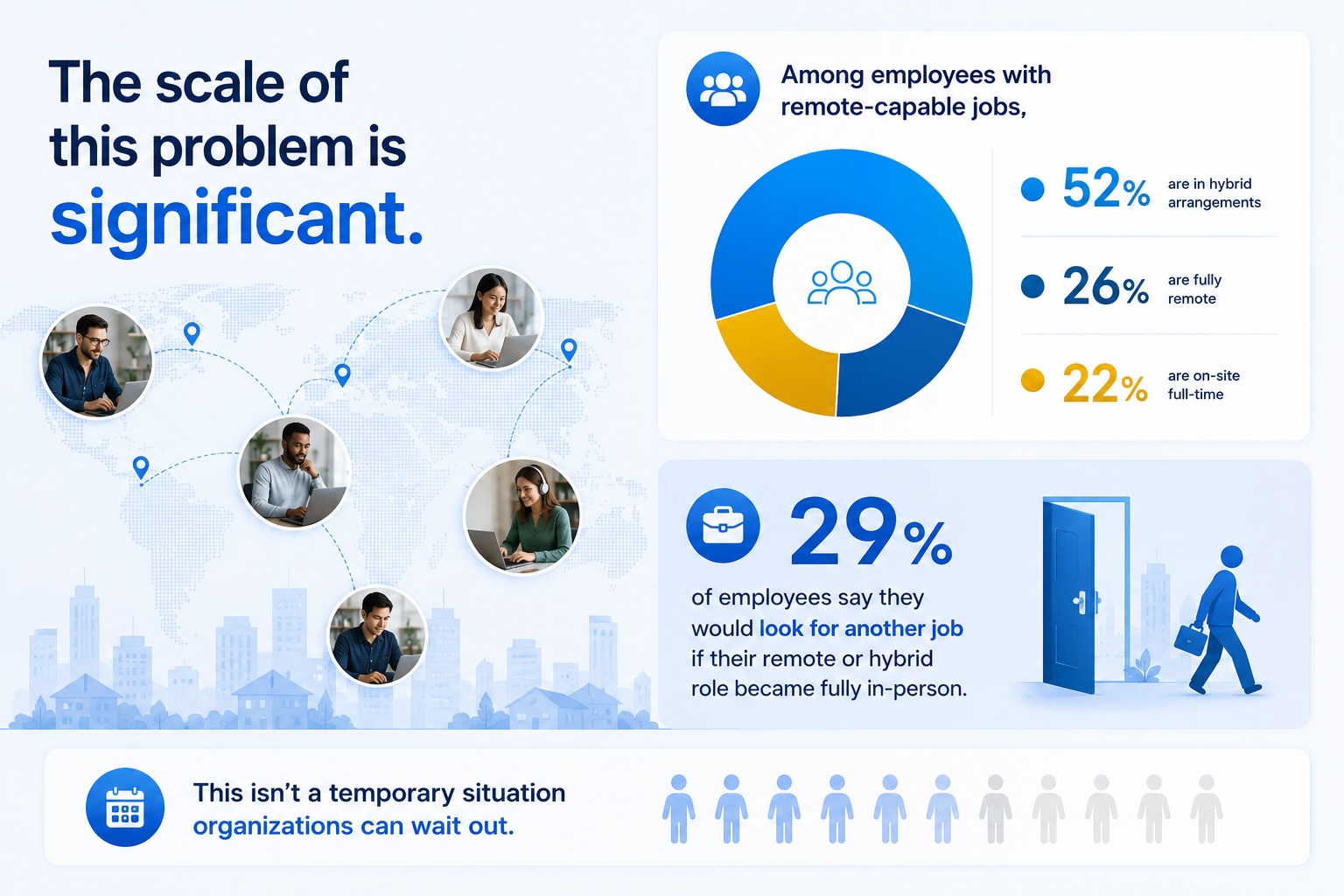
The scale of this problem is significant. According to Gallup, among employees with remote-capable jobs, 52% are in hybrid arrangements and 26% are fully remote - meaning the majority of knowledge workers are operating without the informal communication infrastructure the office used to provide. And 29% of employees say they would look for another job if their remote or hybrid role became fully in-person, so this isn't a temporary situation organizations can wait out.
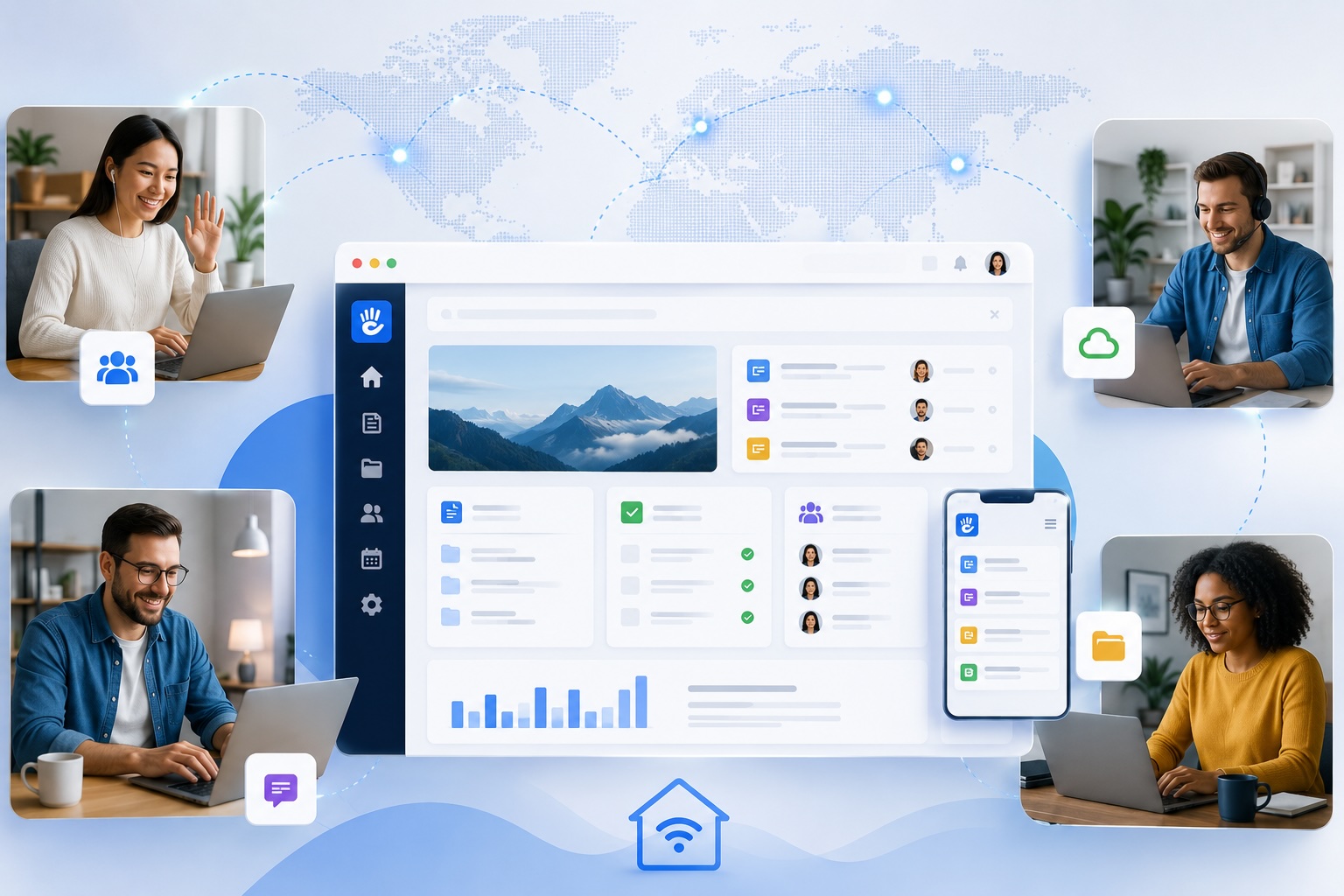
An intranet for remote workers is what replaces all of that - not with more tools, but with a single secure digital hub where the answers actually live: centralized company news, HR tools, employee directories, file libraries, and everything a distributed team needs to stay aligned and move fast.
Why Remote Work Intranets Are Essential
In a physical office, tribal knowledge is annoying but manageable. The people who know things are nearby, and eventually you learn who to ask. It's inefficient, but the inefficiency is spread thin enough that most organizations never notice it on a balance sheet.
Remote work changed the math. When your team is distributed across time zones, asking a quick question costs a lot more than it used to. You send a message, wait hours for a response, get pointed to someone else, wait again. A question that would have taken 30 seconds to answer in person takes half a day asynchronously - and that's assuming the person you're asking actually knows the answer and isn't just guessing.
Multiply that across an organization of a few hundred people and you're looking at an enormous amount of wasted time every single week. Most of it never shows up in any report because no one tracks "hours spent looking for information that should already be findable."
New hires feel this the most. In an office, onboarding has a natural social component - people introduce themselves, offer to show you around, explain how things work informally. Remotely, you get a welcome email, a stack of documents, and a calendar full of intro calls with people you've never met. If the information you need isn't written down somewhere findable, you either ask a lot of questions (and worry you're asking too many) or you just stay confused longer than you should.
High early turnover at distributed companies is often a symptom of this. People don't leave because the job is bad - they leave because they never felt like they figured out how things worked. A well-built intranet for remote workers directly addresses that problem. It's worth noting that 72% of remote workers say remote work improves work-life balance - the flexibility itself isn't the problem. The problem is that most organizations never built the information infrastructure to support it.
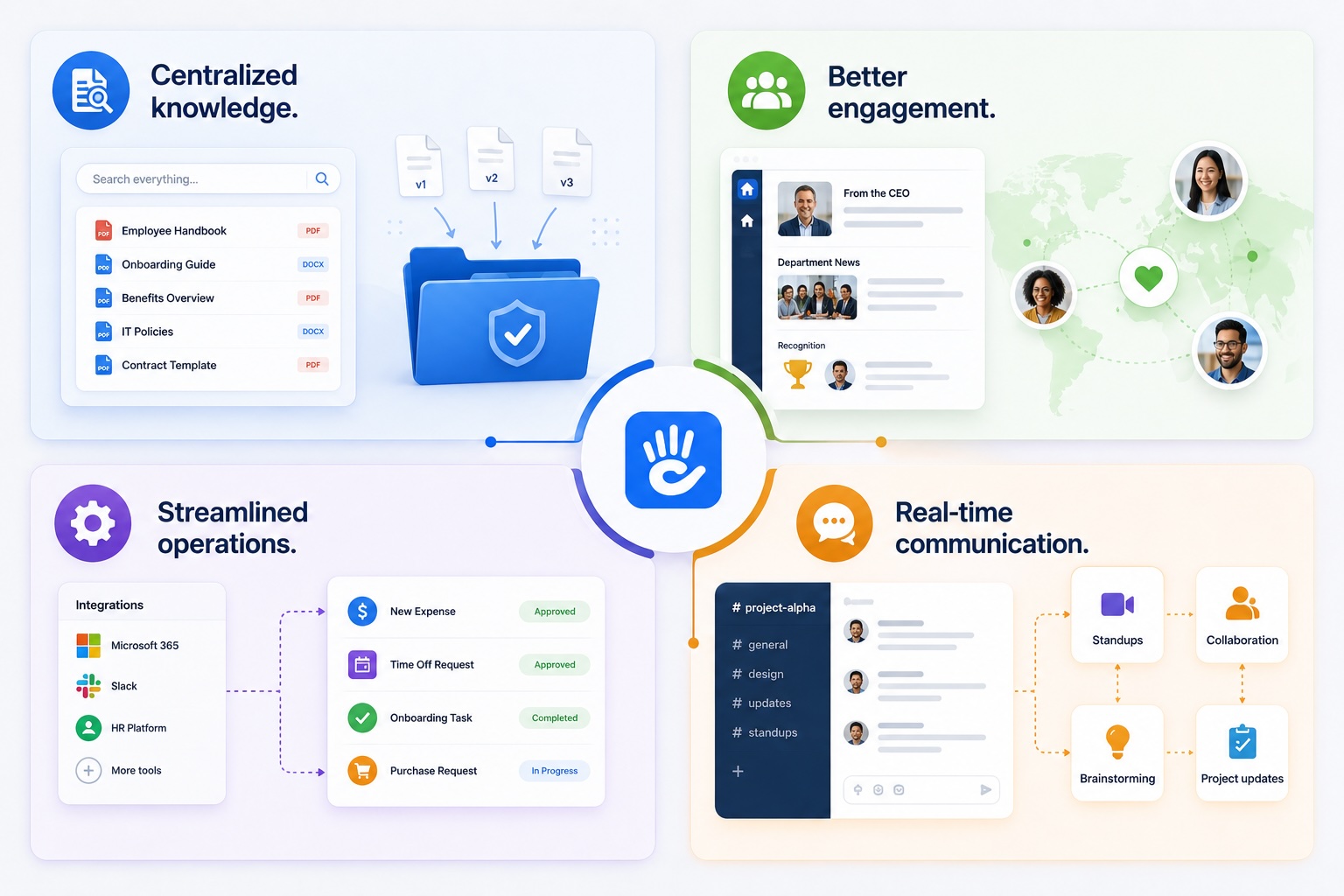
Centralized knowledge. Standardized contracts, employee handbooks, and onboarding materials live in one searchable place instead of scattered across inboxes and shared drives. No more "which version is current?" conversations.
Better engagement. Remote employees who don't feel connected to the organization disengage faster. CEO blogs, department news feeds, and recognition boards keep culture alive when there's no office to absorb it from.
Streamlined operations. A good intranet integrates with the tools your team already uses - Microsoft 365, Slack, your HR platform - so workflows, expense approvals, and task management happen in one place instead of five.
Real-time communication. Dedicated channels and messaging tools support project collaboration, daily standups, and brainstorming without requiring another subscription to another app.
What Remote Teams Actually Need From an Intranet
It's worth being specific here, because "intranet" can mean a lot of things and most of the bad ones were built around the wrong assumptions.
Remote teams don't need another place to store documents. They have SharePoint, Google Drive, Dropbox, and three different project management tools for that. What they need is a place where information is organized around how people think about their work, not how IT organized a file system.
In practice that means four things:
Answers without asking anyone. The vacation policy, the expense reimbursement process, who owns the website, what software the company uses for payroll - this stuff should be findable by anyone, at any hour, without requiring a synchronous interaction. If it isn't, you're paying someone to answer the same questions over and over.
Knowing what's happening at the company. Remote employees don't absorb company news through proximity the way office employees do. They don't overhear conversations, see the whiteboard in the conference room, or get pulled into an impromptu update. If leadership isn't publishing somewhere people actually check, the communication isn't happening.
Onboarding that doesn't require a handler. A good HR intranet lets a new hire spend their first week learning how the organization works rather than scheduling 1:1s to ask basic questions. That's better for the new hire and better for everyone whose calendar is currently full of "quick intro calls."
Knowing who to go to for what. Employee directories with actual context - not just names and email addresses, but what each person owns, what team they're on, what they're working on - make distributed teams feel smaller than they are.
Why Most Remote Teams End Up With the Wrong Solution
The tools remote teams reach for first - Slack, email, SharePoint, pinned messages - all have the same fundamental problem: they're optimized for communication, not for findability.
A Slack channel is great for a conversation happening right now. It is terrible for storing information someone needs to find six months from now. The search works in theory, but in practice no one can remember which channel it was in, what it was called, or when it was posted. Information in Slack has a half-life of about a week before it's effectively gone.
Email is worse. The moment important information lives in someone's inbox, it's invisible to everyone else. When that person leaves the company, it's gone entirely.
SharePoint gets used because it's already there - it comes with the Microsoft 365 license and IT can set it up without a procurement process. But SharePoint is a document management system. It organizes files well. It does not create an engaging destination that employees choose to visit, and most employees can tell the difference. The search is frustrating, the navigation feels like a file system, and no one reads the news section because it looks like a spreadsheet. We cover this in more detail in our post on why SharePoint isn't enough for internal communications.
None of these tools are wrong for what they were designed to do. They're just not a remote work intranet, and using them as one means accepting all of their limitations as communication platforms.
Best Practices for a Secure and Effective Remote Intranet
Getting the platform right is only half the job. How you deploy and maintain an intranet for hybrid work matters just as much as which platform you choose.
Secure access without friction. Remote workers need to get in from home networks, coffee shops, and mobile devices. The right approach is browser-based access authenticated via single sign-on (SSO) tied to your existing identity provider - Microsoft, Google, or Okta. Multi-factor authentication (MFA) adds a layer of security without adding much friction. Requiring a VPN for every login creates enough friction that employees start looking for workarounds.
Mobile-first, not mobile-friendly. There's a difference. Mobile-friendly means the desktop site scales down. Mobile-first means the intranet was designed for phone use from the start. Field workers, frontline staff, and employees who work across locations need an intranet that works on iOS and Android as well as it works on a laptop.
Put content ownership where it belongs. If updating a page requires IT involvement or a developer, the content will go stale. Stale content means employees stop trusting the intranet. Employees who don't trust it stop visiting. The editing experience needs to be intuitive enough that a communications manager or HR professional can own their section without help. That's not a nice-to-have - it's the difference between an intranet that stays alive and one that quietly dies over 18 months.
Measure what's working. Use intranet analytics to track which content gets used, what employees are searching for, and which teams are engaging least. The teams with the lowest intranet engagement are often the ones most at risk of feeling disconnected. Knowing that early gives you a chance to do something about it.
What a Good Remote Intranet Looks Like in Practice
The answer isn't more communication. It's better organized information. A destination that's genuinely pleasant to navigate, where content is maintained by the people who own it, and where finding something doesn't require a search that returns 400 results from 2019. You can read the full story in the BASF case study.
The practical markers of a good remote work intranet are straightforward: employees check it without being told to, new hires can onboard without a dedicated handler, and the people responsible for content actually keep it current because the editing experience isn't painful.
Want to see what that looks like for your organization? Schedule a demo and we'll walk you through it.
The Adoption Problem Is Real - Here's How to Solve It
Getting employees to actually use the intranet is where most projects stall. You can build a good intranet for remote workers and still have adoption problems if you approach the launch wrong.
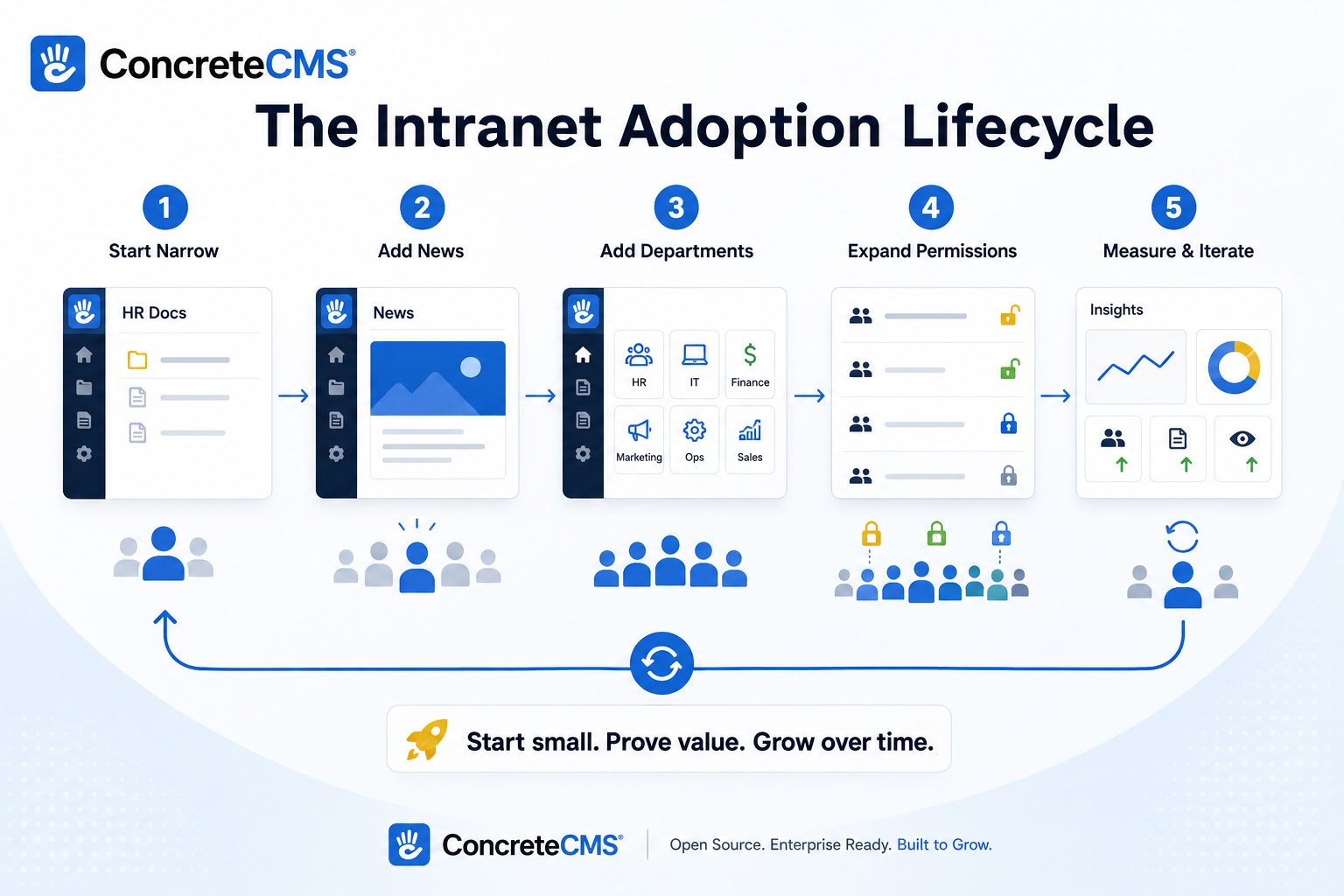
The biggest mistake is trying to make the intranet everything on day one. Organizations build out every department, migrate years of old content, add social features, set up integrations - and then launch something so sprawling that employees don't know where to start. The content is a mix of current and outdated. Navigation is complicated. No one is sure what the intranet is actually for.
A better approach: start with one thing that employees genuinely need, make it excellent, and let adoption build from there. HR information is usually the right starting point. Benefits documentation, the employee handbook, onboarding materials, PTO policies - this is content people actively look for, it's relatively stable, and getting it right creates a reason to visit the intranet that doesn't require any marketing. See our guide on increasing employee engagement with intranet content for more on this.
Once employees are coming to the intranet for HR information, add company news. Once they're reading the news, add department pages. Each addition expands the reasons to visit, and the habit compounds. The organizations that end up with intranets people love almost always got there by starting narrow and expanding deliberately, not by trying to launch everything at once.
How to Get Started Without a Six-Month Project
The reason most intranet for remote work projects stall before they start is that they get scoped as infrastructure projects - big IT initiatives with long procurement cycles, extensive requirements gathering, and a launch date that keeps moving. By the time anything ships, the person who championed the project has moved on and the energy is gone.
It doesn't have to work that way. The organizations that end up with good intranets usually started with a project manager or communications director who identified a specific problem, picked a platform they could get running quickly, and showed value before anyone could argue about whether it was the right long-term choice.
Concrete CMS is built for exactly this. You can have an HR information hub running in weeks, not months - without a developer, without an IT project, and without a procurement process that takes a quarter. The platform ships with powerful permissions, workflow, and SSO integration built in, so you're not stitching together extensions from different vendors just to get basic functionality working. When it works (and it will), expanding it becomes easy to justify because the value is already visible.
If you want to see what a remote work intranet looks like before committing to anything, the fastest way is to try it. Schedule a demo and we'll set you up with a live instance you can actually use.
The Communication Problem Remote Work Made Worse
Poor communication was already expensive before remote work. A distributed workforce makes it worse in ways that are hard to see until the damage is done.
In an office, communication has ambient channels - hallway conversations, overheard meetings, body language in a conference room. Remote teams lose all of that. What's left is deliberate communication: things people consciously choose to write down and send. The problem is that most organizations never built the habit of writing things down, because they never had to.
The result is that remote employees are often making decisions with incomplete information, not because their managers are withholding anything, but because the information never got documented anywhere findable in the first place. A policy change gets announced in a team meeting. Half the team was async. The Slack message gets buried. Six months later someone does something the wrong way because they genuinely didn't know.
An intranet for remote work fixes this at the source. When the policy change gets published as a page that anyone can find, search for, and link to, the communication actually happened. When a leadership update goes in the news hub rather than an email that 40% of recipients don't open, it has a permanent home people can reference later. When the onboarding guide lives somewhere structured rather than in a Google Doc shared with new hires and then forgotten, new employees can actually rely on it.
This is what effective workplace communication looks like at scale - not more messages, but better infrastructure for the messages that matter. The impact on team collaboration is real: fewer misalignments, faster onboarding, and a distributed team that actually feels like one organization rather than a collection of people on the same Slack workspace.
We've written more about this in the impact of poor communication in the workplace - worth a read if you're trying to make the case internally for why an intranet is worth the investment.
Further Reading
- What Is an Intranet? Real-World Examples and Everything You Need to Know
- Why Employees Don't Use the Intranet and How to Fix It
- How to Use an Intranet for Internal Communications
- Using an Intranet for HR: Tips and Best Practices
- 8 Ways to Increase Employee Engagement with Intranet Content
- Why SharePoint Isn't Enough for Your Internal Communications
- Enterprise Intranet Solutions with Concrete CMS: Use Cases and Success Stories
- Mastering Communication in the Workplace
- The Impact of Poor Communication in the Workplace and How to Fix It
References
Gallup. (2024). Hybrid work indicator. Retrieved May 27, 2026, from https://www.gallup.com/401384/indicator-hybrid-work.aspx
Robert Half. (2026). Remote work statistics and trends. Retrieved May 27, 2026, from https://www.roberthalf.com/us/en/insights/research/remote-work-statistics-and-trends
SurveyMonkey. (2026). Remote and hybrid work statistics. Retrieved May 27, 2026, from https://www.surveymonkey.com/learn/employee-feedback/remote-hybrid-work-statistics/
Worktime. (2026). Remote work statistics. Retrieved May 27, 2026, from https://www.worktime.com/blog/statistics/remote-work-statistics
Vena Solutions. (2026). Remote work statistics. Retrieved May 27, 2026, from https://www.venasolutions.com/blog/remote-work-statistics
Founder Reports. (2026). Return to office statistics. Retrieved May 27, 2026, from https://founderreports.com/return-to-office-statistics/
Gable. (2026). Work from home statistics. Retrieved May 27, 2026, from https://www.gable.to/blog/post/work-from-home-statistics
Chanty. (2026). Remote work statistics. Retrieved May 27, 2026, from https://www.chanty.com/blog/remote-work-statistics/
Breeze. (2026). Remote work statistics. Retrieved May 27, 2026, from https://www.breeze.pm/blog/remote-work-statistics