Neither speed nor beauty is at war. They can be used simultaneously. The fastest websites in the world, for instance, Stripe, Apple, and Medium, are also among the most visually appealing. They make a very important point: it is possible to create sites that look great and still load quickly. You are not forced to give up one for the other.
The catch? You need a strategy. And you need to start thinking about speed before your designer opens Figma.
Why Your Beautiful Website Might Be Losing Visitors
Short answer: slow websites lose visitors.
Website performance refers to how quickly a page loads and becomes usable for visitors, including how fast users can see content and interact with the page.
Research from Google shows that as page load time increases from 1 second to 3 seconds, the bounce rate increases by over 32%. Each additional second can cost roughly 1% (or more) in conversions. That’s not a design issue; it’s a business issue.
The Real Cost of Ignoring Speed
A slow website feels broken. When visitors wait longer than three seconds, they don’t assume your images are loading; they think something’s wrong. They hit the back button.
For website managers, this is especially painful. Traffic drops, engagement falls, and suddenly the site is “underperforming,” even though the design looks incredible. Speed often gets blamed on “technical stuff,” but the reality is simpler: performance is part of good design, not an afterthought.
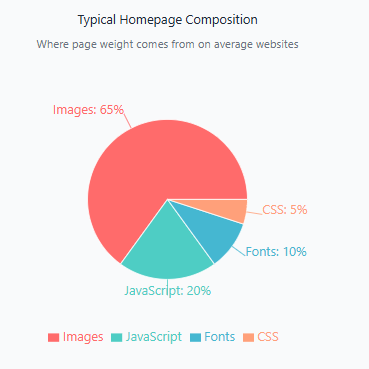
Figure 1: Typical homepage composition by file type. Images account for the majority of page weight on average websites.
What Slows Down Beautiful Websites
Let's be honest: beautiful things are often heavy.
A gorgeous hero image? That's 2 to 5 megabytes. A video background? 8 to 15 megabytes. Custom fonts? 50 to 200 kilobytes each. Smooth animations powered by JavaScript? Those add up quickly, too.
Each of these elements makes your site look premium. The problem is, they add weight fast. And weight equals time.
A typical visitor on a 4G connection can download about 1 megabyte per second. So if your homepage is 5 megabytes, that's a 5-second load time before the page is even interactive. Add a slow server, a far-away data center, or network hiccups, and you're at 8 or 10 seconds. That visitor is long gone.
But here's the thing: you don't delete these elements to fix the problem. You optimize them.
Quick Wins That Keep Beauty and Speed
You can cut load times by 50% or more without redesigning your site. Here’s how.
Compress and Convert Your Images
Designers often deliver high-resolution images and that’s fine. The mistake happens when those images go live unchanged.
What to do:
Convert images to modern formats like WebP, which are typically 40–60% smaller than JPEGs or PNGs. Free tools like Squoosh (by Google) or ImageOptim make this painless.
Visitors won’t notice any quality loss. They will notice that your site loads faster.
Pro tip: serve different image sizes for mobile and desktop. A phone doesn’t need a 4,000-pixel-wide image.
Lazy Load Images Below the Fold
Not every image needs to load instantly.
What this means:
Above-the-fold images load immediately. Images further down the page load only when visitors scroll near them.
Why it works:
The first impression becomes dramatically faster, while the page still looks beautiful as users explore.
How easy is it?
Most modern content management systems, including Concrete CMS, support lazy loading automatically or with minimal setup.
Simplify Your Animations and Fonts
Animations and typography add polish, but excess slows everything down.
What works well:
- CSS-based animations
- Subtle transitions instead of complex motion graphics
Font strategy:
Use system fonts for body text and one custom font for headings. Loading three or four custom font families can add seconds to load time.
The trade-off:
Your site still feels premium, and it performs better.
Let Your Design Philosophy Guide Your Speed Strategy
The best modern design trends are naturally fast.
Minimalism Isn’t Just Pretty. It’s Fast.
Minimalist design relies on whitespace, strong typography, and intentional layouts. Fewer elements mean fewer files to load.
Why is it fast? Because it doesn’t rely on heavy assets.
Build Speed Into Your Project Plan From the Start
Performance shouldn’t be a cleanup task at the end.
Here’s what this looks like in practice:
When you brief your designer, mention performance. Say something like: “We want this to look premium, and we also want it to load in under 2 seconds. What can we do together to make that happen?”
Before your developer starts building, agree on a page weight budget. Aim for under 3 megabytes for a homepage.
During development, check load times weekly. Use Google PageSpeed Insights. Problems caught early are problems fixed cheaply.
This approach takes 10% more time upfront. It saves you weeks of frustration later.
Use Your CMS to Automate Performance
You shouldn’t manage performance manually.
A modern CMS can handle many performance optimizations automatically.
What to look for in a CMS:
- Built-in image compression
- Automatic lazy loading
- Caching options
Real benefit: less stress, faster sites, happier users.
The Instant Page Speed Magic add-on for Concrete CMS provides deferred asset loading, automatic minification, and robust lazy loading to significantly improve performance and PageSpeed scores.
You’ve Got This
Building beautiful websites doesn’t mean accepting slow websites. These aren’t enemies. They’re partners.
Your role as a website manager gives you more power than you might think. You can advocate for performance without being technical. You can speak about business impact.
Fast, beautiful sites build trust. They convert better. They feel professional and intentional.
Your next site can be both. Run your homepage through Google PageSpeed Insights today. You might be surprised how close you already are.
References
Google. (2018). The need for mobile speed. Think with Google.
https://www.thinkwithgoogle.com/marketing-strategies/app-and-mobile/page-load-time-statistics/
Linden, G. (2006). Slides from my talk at Stanford: Marissa Mayer at Web 2.0.
http://glinden.blogspot.com/2006/12/slides-from-my-talk-at-stanford.html