A vendor says its CMS has AI. What did they just promise? It could be a button that drafts a paragraph. It could be an agent that edits your live pages. It could be a chatbot that answers questions from your content. Those are three different products with three different risks, sold under one phrase.
People search for "AI content management system" and "AI CMS" because they want to know which one they are buying. This guide separates the three meanings, shows what can go wrong with each, and gives you questions to ask before you sign. It ends with a plain account of where Concrete CMS stands on each one.
In short
- "AI in a CMS" means one of three things: AI inside the editor, AI that operates the CMS, or AI that answers users from your content.
- The risk grows with the freedom the AI has. A suggestion a person reviews is safer than an agent that can publish.
- Ask every vendor the same six questions: permissions, review before publish, audit trail, data handling, model choice and cost.
Three meanings, three levels of control
The useful question is who is in control when the AI acts (Figure 1). In the editor, a person is. When an AI app operates the CMS, the AI chooses the actions, within the access you gave it. When an assistant answers users, the AI writes the reply, and the CMS has to decide what it may draw on.
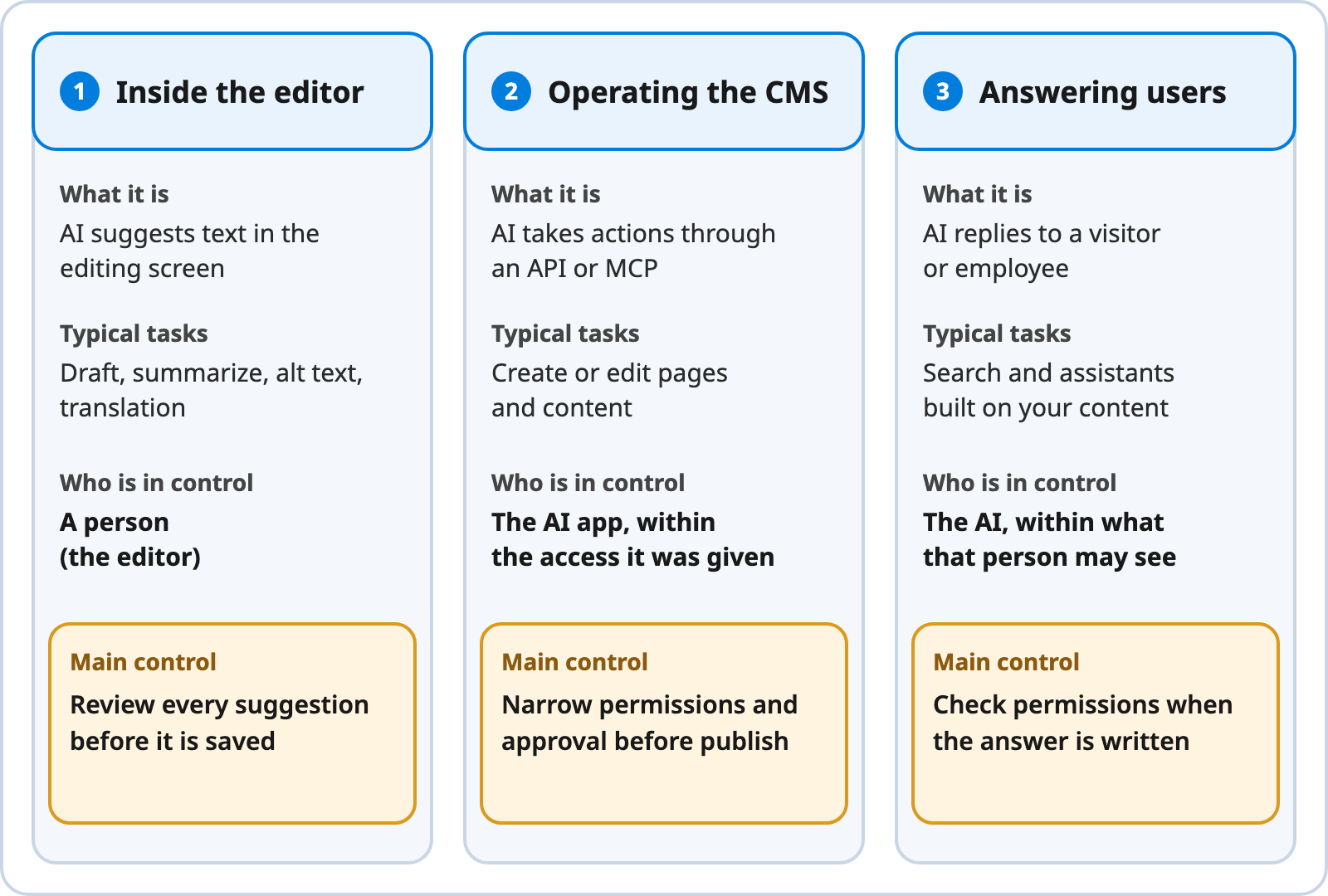
Three Meanings of AI in a CMS
Note. Created by Concrete CMS.
Text description of Figure 1
1. Inside the editor. AI suggests text in the editing screen: drafts, summaries, alt text and translation. A person, the editor, is in control. The main control is to review every suggestion before it is saved.
2. Operating the CMS. AI takes actions through an API or MCP, such as creating or editing pages and content. The AI app is in control, within the access it was given. The main controls are narrow permissions and approval before publishing.
3. Answering users. AI replies to a visitor or employee, as in search and assistants built on your content. The AI is in control, limited to what that person may see. The main control is to check permissions when the answer is written.
1. AI inside the editor
What it does. It suggests text while someone edits: a first draft, a summary, alt text, a translation, a draft of a meta description. The editor reads the suggestion, changes it and saves it.
What can go wrong. Invented facts that read well. Private text pasted into a prompt and sent to an outside model. Alt text is a good example. The W3C decision tree for alt text asks whether an image carries meaning in its page, whether it works as a link or button, and whether it is decorative (Web Accessibility Initiative, n.d.). In our view, a tool that sees only the image can describe it but cannot know its purpose on your page, so a person still has to decide.
What to ask. Where does the text go when you press the button? Which model answers, and can we change it? Does the draft land as a draft, or can it overwrite live copy? Who pays per use?
2. AI that operates the CMS
What it does. An AI app uses the CMS's API to read, create or change content for you. A common route is MCP, the Model Context Protocol. In MCP, an AI app (the host) connects to servers, and servers offer tools: executable functions the AI can invoke, such as API calls (Model Context Protocol, n.d.). The AI chooses which tool to call.
What can go wrong. OWASP Foundation (2025) names the problem excessive agency: damaging actions taken in response to unexpected, ambiguous or manipulated model output. It lists three root causes, which are too much functionality, too many permissions and too much autonomy. Its fixes: offer the minimum tools, grant the minimum permissions, run actions as the signed-in user, and require human approval for high-impact actions. Logging and rate limiting do not prevent harm but can limit it.
What to ask. Which actions can the agent take, and can we turn each one off? Does it sign in as a person, with that person's permissions? Does everything it creates stay unpublished until someone approves it (Figure 2)? Can we see a log of what it did?
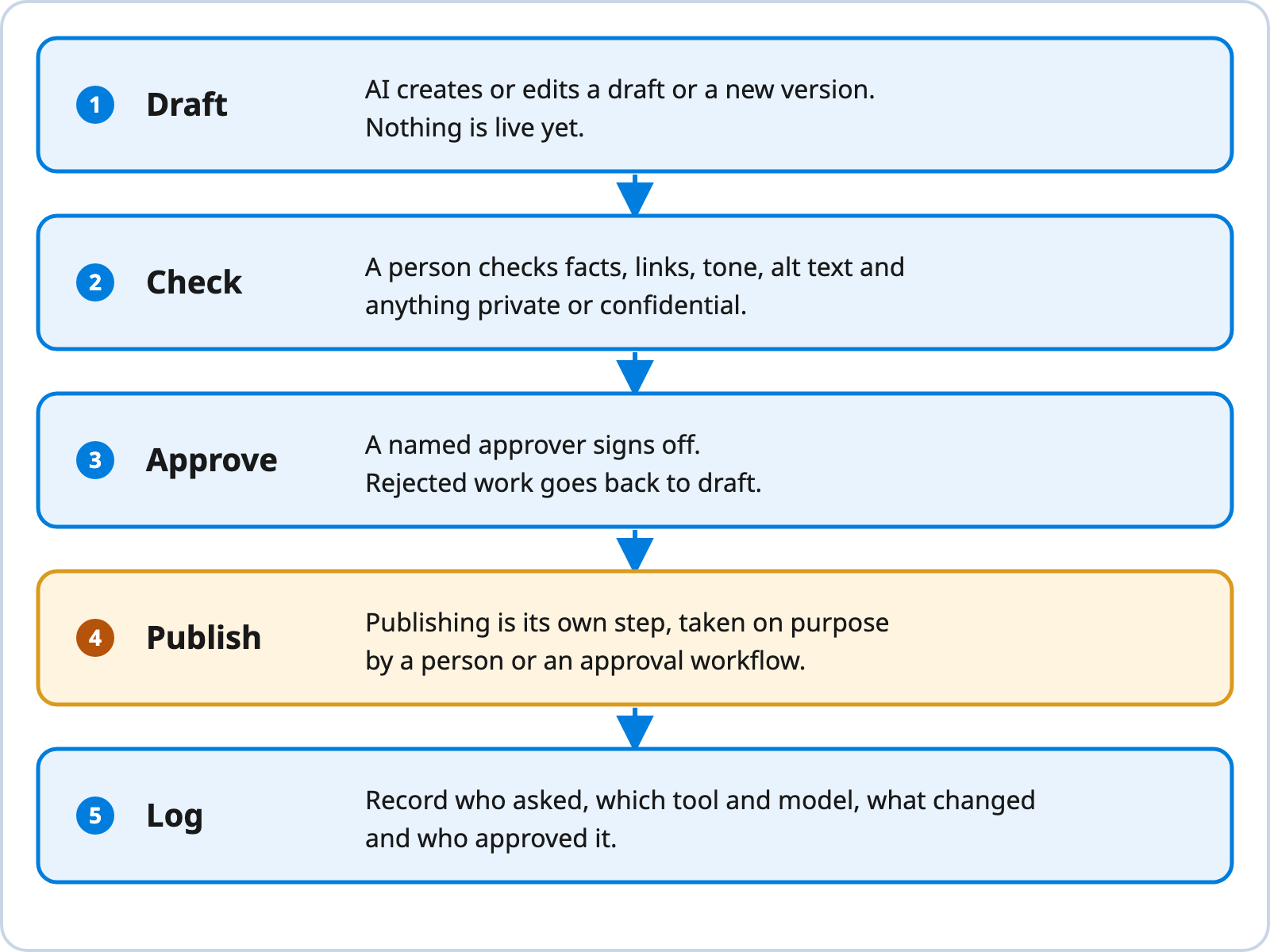
Review Flow for AI-Generated or AI-Edited Content
Note. Created by Concrete CMS. The approval and logging steps follow the human-approval and monitoring advice in OWASP Foundation (2025).
Text description of Figure 2
- Draft. AI creates or edits a draft or a new version. Nothing is live yet.
- Check. A person checks facts, links, tone, alt text and anything private or confidential.
- Approve. A named approver signs off. Rejected work goes back to draft.
- Publish. Publishing is its own step, taken on purpose by a person or an approval workflow.
- Log. Record who asked, which tool and model, what changed and who approved it.
3. AI that answers users from your content
What it does. A visitor or employee asks a question and an assistant answers from the site's content. This is search and retrieval, not editing.
What can go wrong. The assistant reveals something the asker should not see, or it answers from a stale copy. Many systems copy content into a separate index and check access once, when the copy is made. Our AI intranet guide covers this in depth, and our intranet permissions post explains why visibility is the main control on an intranet. A second risk is plain wrong answers, so ask whether the assistant can show which pages it used.
What to ask. Is content copied elsewhere? How quickly does a permission change reach the assistant? Can we see the sources behind each answer?
What to ask: one checklist for all three
Use the same questions with every vendor, then compare the answers by meaning. Costs and model terms change often, so ask for current written terms rather than relying on a web page.
| Question | 1. Inside the editor | 2. Operating the CMS | 3. Answering users |
|---|---|---|---|
| Permissions | Who can use the AI button, and on which content? | Which actions and scopes does the agent get? Is that the minimum? | Are answers limited to what this person may see, checked at answer time? |
| Review before publish | Does a person approve each change? | Does agent work stay unpublished until approved? | Is there a way to flag and correct a wrong answer? |
| Audit trail | Is AI use recorded on the page history? | Is every action logged with who asked and what changed? | Are questions, sources and answers logged? |
| Data handling | What text leaves our site, and who stores it? | Where do credentials and tokens live? | Is our content copied into another store? |
| Model choice | Which model, and can we switch? | Which AI apps can connect? | Which model writes answers, and where does it run? |
| Cost | Per user, per use or bundled? | Model fees plus staff time to review. | Model fees per question, plus hosting and upkeep. |
Model choice deserves its own thought. One of our writers found that moving between AI tools is mostly a problem of moving context, not of picking a winner (see ChatGPT vs Claude). Ask whether the vendor's design lets you change models later.
How Concrete CMS approaches each one
Here is what exists and what does not, as of October 2026.
Inside the editor. We did not find built-in AI authoring features in the Concrete CMS documentation and pages we read. What we did find is a third-party add-on on the Concrete marketplace. "AI Integration - GPT 4 Turbo," published by De Webmakers, is a plugin for a base add-on called AI Integration and requires it. The listing says it makes GPT-4 Turbo selectable in AI dialogs, including a Bulk SEO Updater and an AI button in the editor toolbar. It says an API key may be needed, lists compatibility with Concrete CMS 9.3.0 and later, and was last updated January 5, 2026 (De Webmakers, 2026). We did not read the base add-on's own listing, we did not install either add-on, and we found nothing documenting AI-generated alt text. Treat this as one option to evaluate, and ask its author the editor questions above.
Operating the CMS. There is a community-built, open source MCP server, MIT licensed, that works through the Concrete REST API (concrete5-community, n.d.). You choose its OAuth scopes, and it saves a refresh token on your computer by default. It also offers page tools that read a page and create an editable page version before updating blocks. Whether that version goes live depends on your own setup, so test it. The README lists testing with other MCP clients as a to-do, so treat anything beyond Claude Desktop as unverified. The page update helper needs three scopes. The README spells the last one pages:areas:update_blocks, while Concrete's scopes page lists pages:areas:update_block, so check your own site's list. The Concrete team's own advice is cautious: it is not a workflow they recommend for everyone, they would not yet give an agent access to a high-profile client's site, and it fits repetitive work that does not touch live content (Concrete CMS, 2026b). Start on a test site with read-only scopes.
Answering users. Atlas is an open source adapter architecture from Macareux Digital. Concrete CMS remains the source of truth for identity, permissions and content, and an AI agent you build or choose handles the questions and answers (Macareux Digital, n.d.). The repository does not include that agent. It also leaves out chat widgets and model integrations, so Atlas is a framework, not a finished assistant (Macareux Digital, n.d.). The adapter reuses the CMS's existing search instead of a separate vector store, and the project says the Concrete Help site runs its adapter in production (Macareux Digital, n.d.). Its author describes the split this way: use Atlas for assistants that serve your users, and MCP when you want AI to act as a CMS user (Hishikawa, 2026). Our Atlas post goes deeper.
Concrete CMS has had role-based permissions, workflow approval and audit trails in core, according to our own Atlas post (Concrete CMS, 2026a). That is the foundation the review flow depends on. It does not make any AI tool safe by itself. That depends on the tool you connect and the scopes you grant.
Where to start
- Name the meaning. Write down which of the three you actually want. Most teams want meaning 1 or 3 first.
- Send the six questions. Use the table above, and get the answers in writing.
- Pilot on low-risk content. Use a test site or a section nobody depends on. Our post on auditing an intranet for stale content with AI shows a read-only task that fits.
- Keep a human at the publish step. Use the review flow in Figure 2 for anything AI touches.
- Review after a month. Read the logs, count the corrections and decide whether to widen access.
Talk to us
Want to talk through where AI fits on your Concrete CMS site? Schedule a demo.