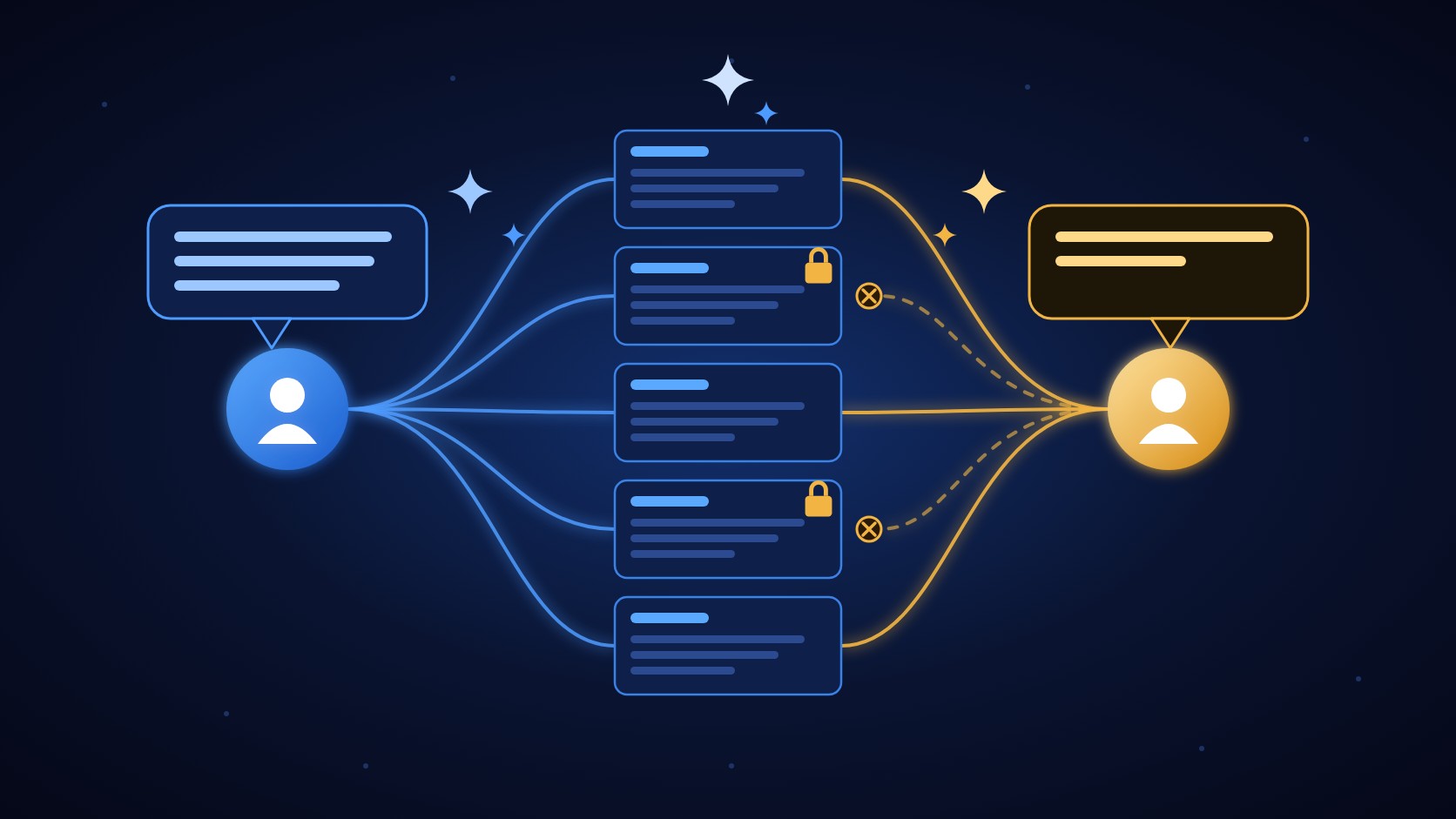
Two employees ask an AI assistant the same question. One can reach five intranet pages, the other three, because two are locked.
Nearly every intranet vendor now sells an AI feature. Most demos look the same: type a question, get a confident answer. What the demo rarely shows is how the AI decides what it is allowed to tell you.
That question matters more on an intranet than almost anywhere else. An intranet holds HR policies, leadership updates, budget notes and drafts that only some people should see. An assistant that answers from all of it, for everyone, is a data leak with a friendly interface.
This guide explains what an AI intranet is, where permissions go wrong, and the questions to ask any vendor (including us) before you buy.
An AI intranet adds search, question answering and writing help on top of your internal content.
The main risk is permissions. The AI has to check who is asking at the moment it answers, not only when content was first loaded.
Ask every vendor where your content is copied, how permission changes reach the AI, and whether you can see what the AI used for each answer.
What is an AI intranet?
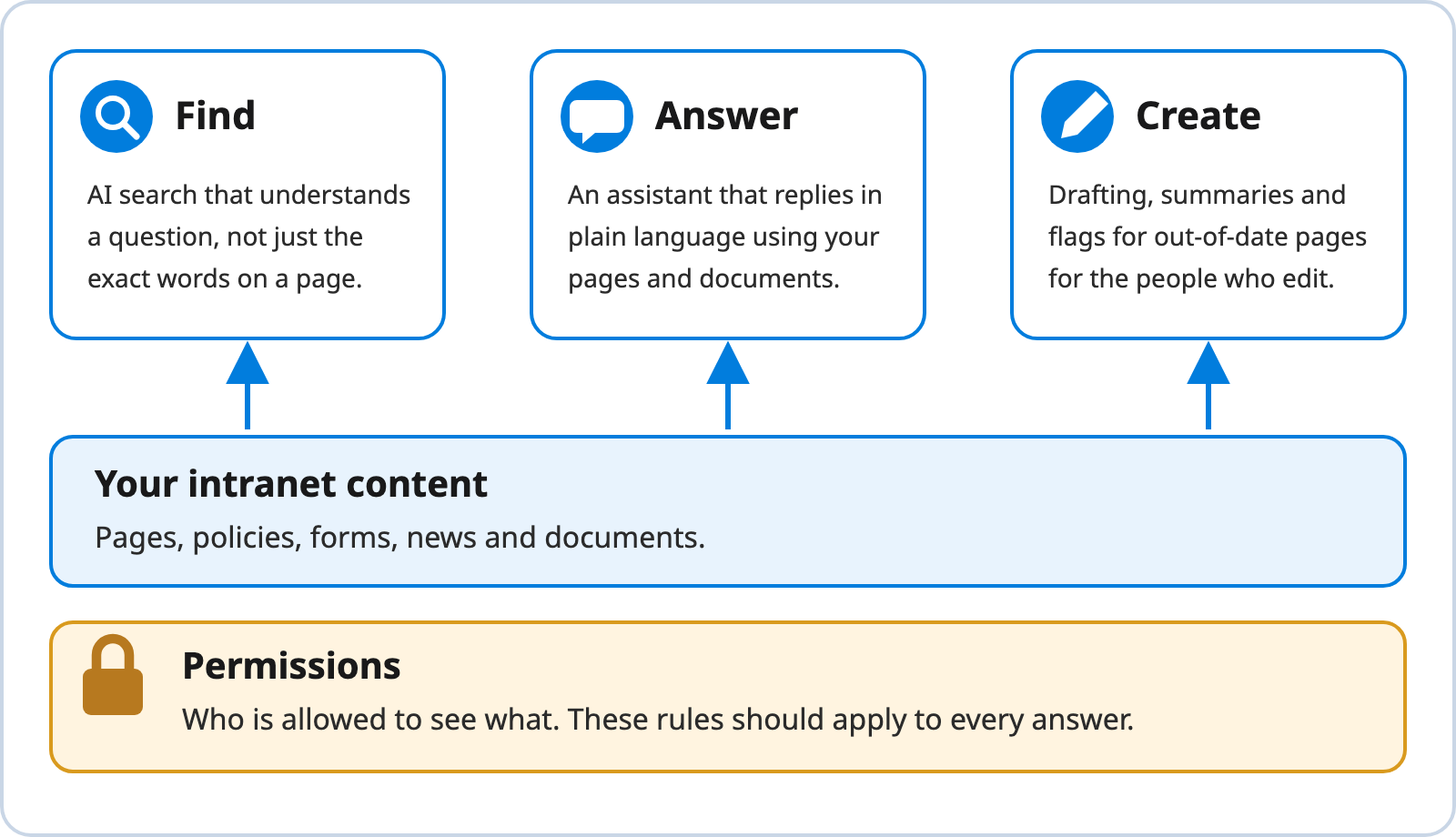
An AI intranet is an intranet where AI helps people find, understand and write content. In practice that usually means three things (Figure 1).
Find: AI search that understands a question, not just the exact words on a page.
Answer: an assistant that replies in plain language using your pages and documents.
Create: drafting, summaries and flags for out-of-date pages, for the people who maintain the site.
Figure 1 What an AI Intranet Adds
Note. Created by Concrete CMS.
Most assistants that answer from your own content use a technique called retrieval-augmented generation, or RAG. Lewis et al. (2020) describe the idea: instead of relying only on what a language model learned in training, the system retrieves relevant material from an outside source and uses it to produce the answer. OWASP Foundation (2025) puts it as combining pre-trained language models with external knowledge sources. On an intranet, that outside source is your content.
The permissions problem
Your intranet already has rules about who can see what. A budget page might be open to finance, a draft policy to HR only, an all-hands update to everyone. The AI has to follow the same rules. The risk is in how content gets to the AI.
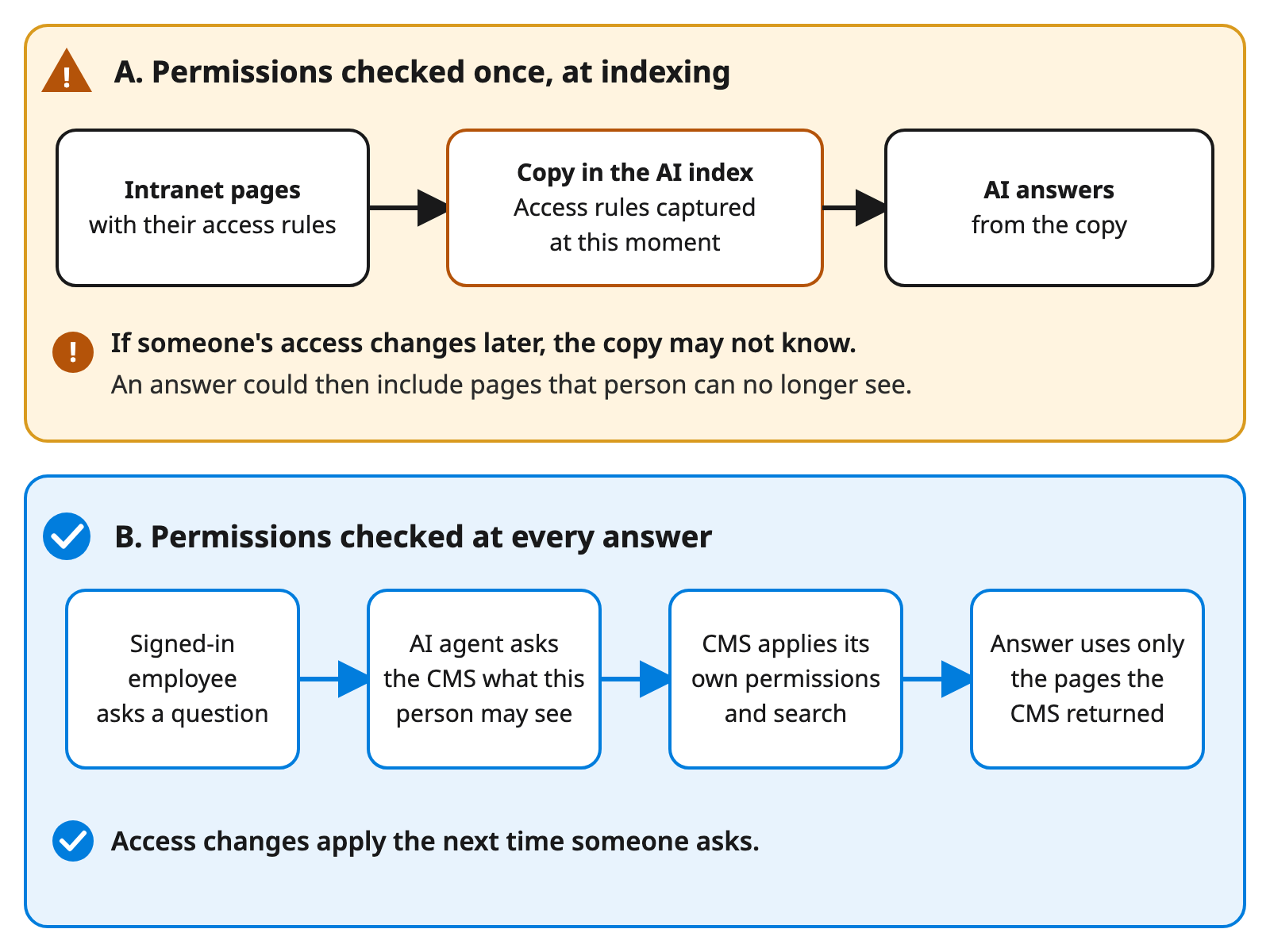
Many RAG systems copy content into a separate search index, often called a vector store, so the AI can find it quickly. Permissions are frequently checked once, when the copy is made. If someone's access changes afterward, the copy may not change with it (Figure 2, pattern A). OWASP Foundation (2025) lists this under vector and embedding weaknesses. It warns that inadequate or misaligned access controls can expose sensitive information held in embeddings, and that shared stores can leak context between different groups of users.
Figure 2 Permissions Checked at Indexing Versus at Every Answer
Note. Created by Concrete CMS. Pattern B reflects the permission-aware approach recommended by OWASP Foundation (2025).Text description of Figure 2
Pattern A, permissions checked once at indexing. Intranet pages and their access rules go into a copy in the AI index, which captures the rules at that moment. The AI then answers from the copy. If someone's access changes later, the copy may not know, so an answer could include pages that person can no longer see.
Pattern B, permissions checked at every answer. A signed-in employee asks a question. The AI agent asks the CMS what that person may see. The CMS applies its own permissions and search. The answer uses only the pages the CMS returned, so access changes apply the next time someone asks.
OWASP Foundation's (2025) recommended fixes are permission-aware stores, strict separation of data between user groups, and detailed logs of retrieval activity. The Macareux Atlas project makes a similar comparison in its documentation. It describes custom RAG pipelines as often weak on permissions because content is usually indexed once and keeping access rules in sync is hard (Macareux Digital, n.d.). That is the project's own assessment, so read it as a design argument rather than independent testing.
Large platforms face the same issue from a different angle. Microsoft (2026) documents that Copilot can only summarize or reference content a user is already authorized to access, and that SharePoint sharing, membership and governance settings influence what Copilot can discover. In other words, the AI respects the permissions you have. If those permissions are loose or out of date, an assistant can make that more visible, which is why Microsoft also points to governance and lifecycle policies that reduce oversharing risk.
How Atlas handles it in Concrete CMS
Concrete CMS has had role-based permissions, workflow approvals and audit trails in core for years. Atlas, an open source framework from Macareux Digital released in July 2026, lets an AI assistant use those controls instead of working around them (Hishikawa, 2026).
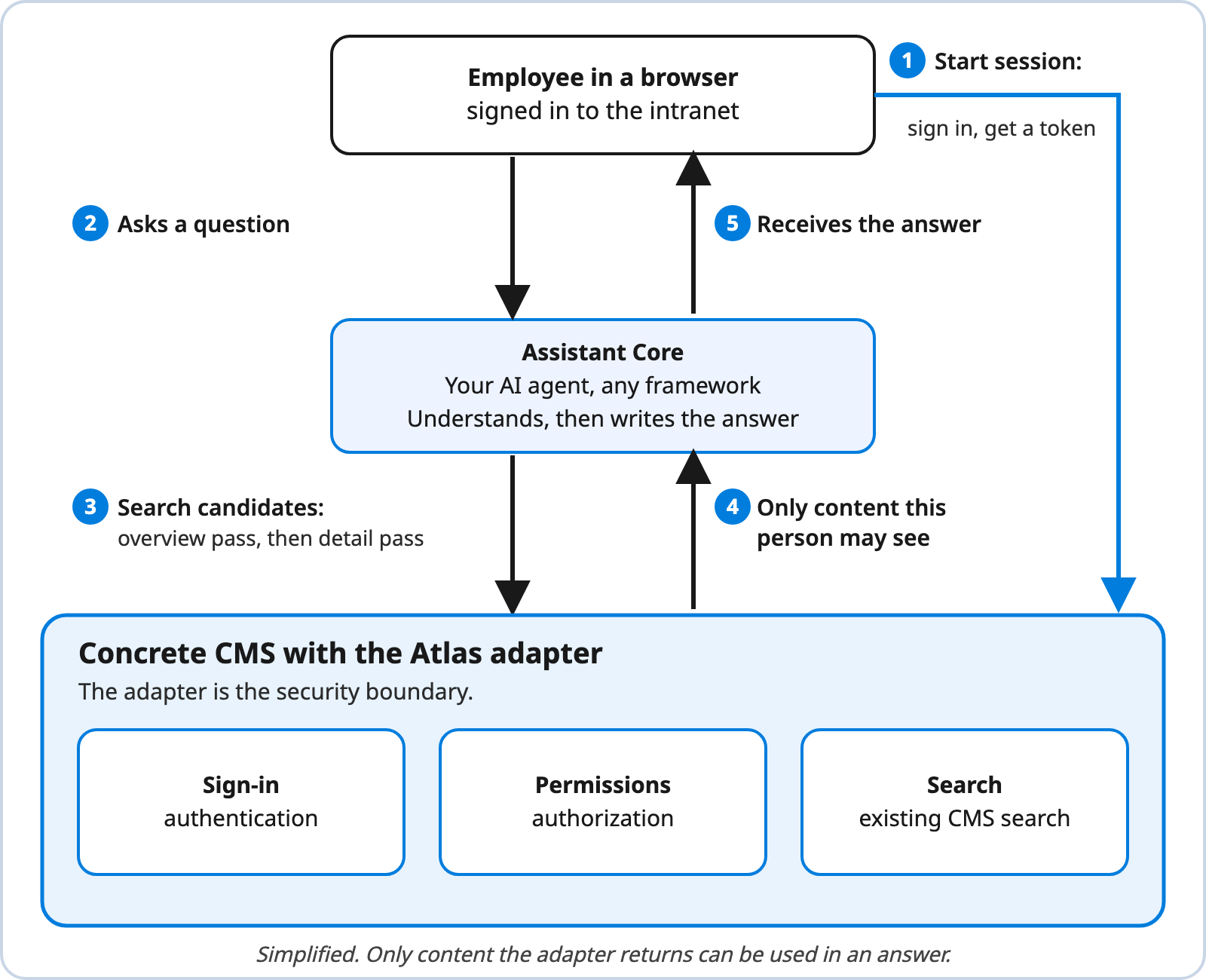
Atlas splits the job in two (Figure 3). Concrete CMS handles sign-in, permissions and content lookup. Your AI agent, which you build or choose, handles understanding the question and writing the answer. A small adapter sits between them as the security boundary: only content the adapter returns for the current session can be used in an answer (Macareux Digital, n.d.).
Figure 3 Simplified Atlas Request Flow
Note. Adapted from Macareux Atlas Framework, by Macareux Digital, n.d. (https://github.com/MacareuxDigital/atlas-framework).Text description of Figure 3
The employee's browser starts a session with Concrete CMS: the employee signs in and gets a token.
The employee asks a question, which goes to the Assistant Core, the AI agent.
The Assistant Core asks Concrete CMS to search, first with an overview pass and then with a detail pass.
Concrete CMS returns only content that person may see.
The Assistant Core sends back an answer based only on that content.
Concrete CMS with the Atlas adapter contains sign-in, permissions and search. The adapter is the security boundary.
Two design choices stand out:
No second copy of your content. Atlas reuses the CMS's existing search in two passes, an overview and then a detail pass, so there is no separate vector store to keep in sync (Macareux Digital, n.d.).
Permissions at answer time. The adapter enforces access per session, so the check happens when someone asks, not only when content is loaded (Macareux Digital, n.d.).
There is a trade-off. In our view, keyword search can miss a question phrased in very different words from the page, which embedding-based search may catch. The project positions Atlas for teams that already trust their CMS search and permissions and want AI on top of them (Macareux Digital, n.d.). Atlas also provides the adapter and specification, not the AI agent itself, which you bring. Macareux Digital runs the reference adapter on its Concrete CMS Help site (Macareux Digital, n.d.).
Atlas is separate from the Concrete CMS MCP server. According to the author, Atlas is for building assistants that serve your users, while the MCP server is for when you want AI to act as a CMS user itself, for content management and automation (Hishikawa, 2026).
Questions to ask any AI intranet vendor
Use these in demos and security reviews. The right-hand column describes what a good answer sounds like.
Eight questions to ask an AI intranet vendor
Question
Why it matters
A good answer
When does the AI check who is allowed to see what?
A check done only when content is first loaded can go stale (OWASP Foundation, 2025).
At every question, for the person asking.
Is my content copied into another system?
Copies can drift from the source and become a second thing to secure.
A clear answer on where copies live, who can reach them and how deletions spread.
How do permission changes reach the AI?
People change roles, and pages move between audiences.
Changes apply the same way they do on the intranet, or the delay is stated.
Can an administrator see what the AI used for an answer?
Without a record you cannot investigate a complaint. OWASP Foundation (2025) recommends detailed logs of retrieval activity.
Per-answer logs showing which pages were used.
How does it treat restricted or labeled content?
Some content should never reach an assistant. Microsoft (2026) describes sensitivity labels and encryption rights limiting what Copilot can use.
Documented support for restricted pages and labels.
How does it stay current when pages change?
Answers drawn from out-of-date content erode trust.
Retrieval at answer time, or a stated refresh schedule.
Which AI model does it use, and can we change it?
This affects data handling, cost and lock-in.
A named provider, clear data-handling terms and a way to switch.
What does it cost to run and maintain?
Indexing, hosting and usage fees can grow after the pilot.
An itemized estimate for your size.
Where to start
Tidy access first. Review who can see what, especially sharing and group membership. The AI will follow whatever rules exist. Our guide to the intranet permissions model is a good starting point.
Pilot with low-risk content. Start with one department or with content everyone is already allowed to read.
Test as different people. Ask the same question as an administrator, an employee and a contractor, and check that the answers differ the way your permissions say they should.
Review feedback and logs. Track wrong answers and anything the AI should not have been able to see, and fix the source content or the permissions.