Requests to internal communications start the same way: "Can you turn this into something people will read?" A 14-page policy needs a one-paragraph summary. A leadership update needs three versions. Last quarter's survey has 900 comments. AI can speed up all of this, and it can also send a confident mistake to every employee at once.
This guide is for directors and managers of internal communications. It covers seven practical uses, in the order most teams try them. Each one has an example, what to check, and the human review step. We start with three ground rules, because they apply to every use.
In short
- Use AI to draft, shorten, adapt and sort. Do not use it to decide what is true or what gets sent.
- Three ground rules come first: no confidential or personal data in tools your organization has not approved, a person reviews everything, and you disclose AI help where your policy says to.
- The more your readers will act on the output, the more review it needs (Figure 1).
Ground rules before you start
- Keep confidential and personal data out of unapproved tools. OWASP Foundation (2025) lists personal data, financial details, health records, confidential business data and credentials as sensitive information. It tells users to understand the risk of providing such data to an AI tool, because it may later appear in the tool's output. For you, that includes unannounced reorganizations, named employee cases and raw survey comments. Use only tools your organization has approved for that kind of data.
- A person reviews everything before it goes out. NIST describes "confabulation" as a system confidently presenting false content, and warns that people may over-rely on AI output (automation bias) (National Institute of Standards and Technology [NIST], 2024). Our post on training makes the same point: build the habit of reviewing output before acting on it (Concrete CMS, 2026e).
- Disclose AI help where your policy says to. NIST suggests considering whether to tell readers that AI was used, weighing the context, the risk and the audience (NIST, 2024). Follow your policy. If you do not have one, write one before you scale up.
Our post on why AI training must be mandatory suggests sorting uses into approved, restricted and experimental, and lists drafting communications for human review and summarizing long documents among typical approved uses (Concrete CMS, 2026e). Treat that as a model for your own list.
Seven practical uses
We grouped the seven uses by how much human review each needs (Figure 1). The examples are illustrations, not results from a study.
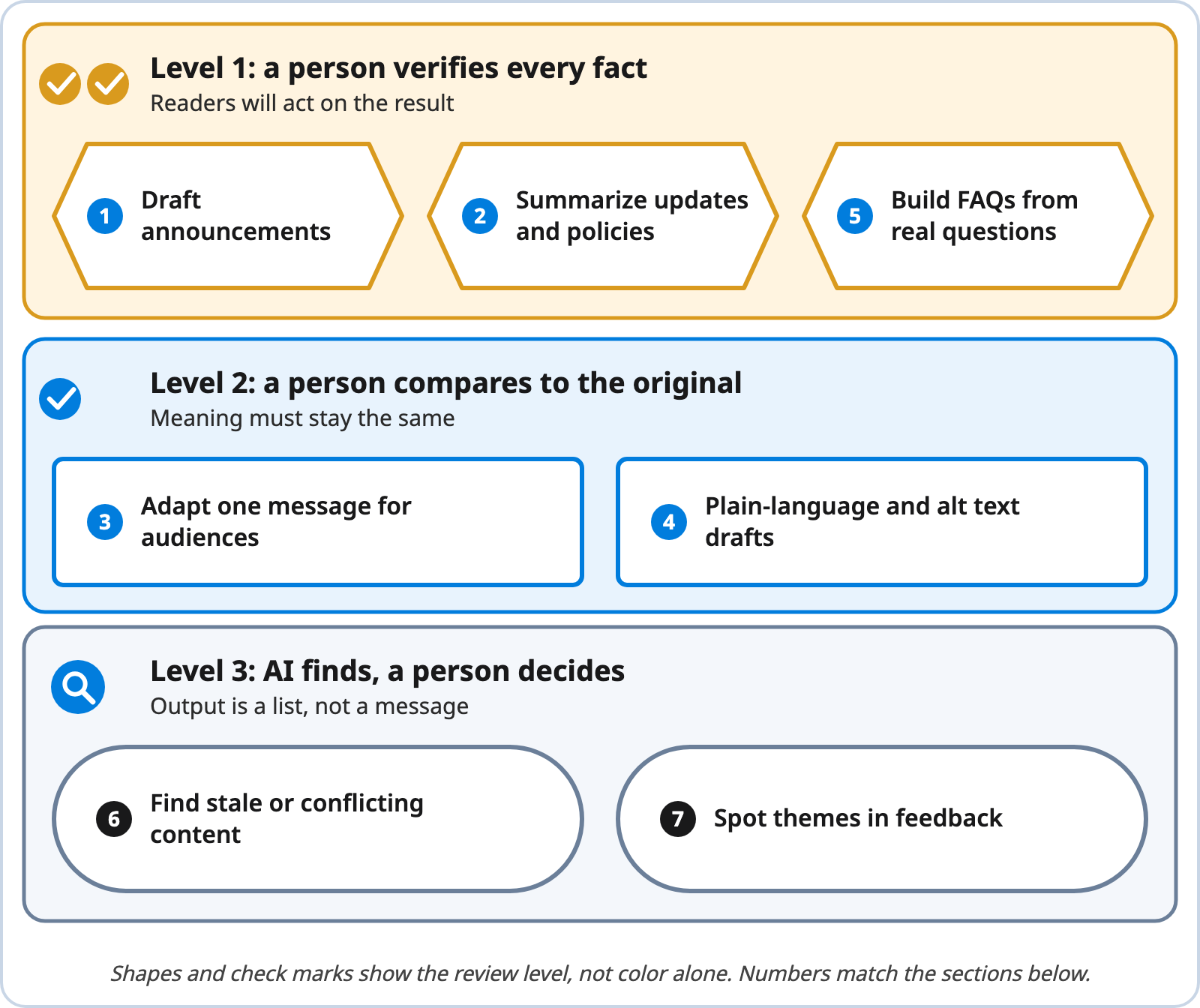
Seven Uses of AI Grouped by Human Review Needed
Note. Created by Concrete CMS. The grouping is our view.
Text description of Figure 1
Level 1, a person verifies every fact (two check marks, hexagon shapes): 1 draft announcements, 2 summarize updates and policies, 5 build FAQs from real questions. Readers will act on the result.
Level 2, a person compares to the original (one check mark, rectangle shapes): 3 adapt one message for audiences, 4 plain-language and alt text drafts. The meaning must stay the same.
Level 3, AI finds and a person decides (magnifier icon, pill shapes): 6 find stale or conflicting content, 7 spot themes in feedback. The output is a list, not a message.
1. Draft announcements
Example: a benefits enrollment reminder. You give the AI the dates, the audience and the action you want, and it returns a first draft.
Start by asking the AI to question you before it writes. Our post on giving AI interviews, not instructions describes this method: the AI asks a handful of questions, and the answers supply the specifics a cold prompt would miss (Concrete CMS, 2026c).
Check: every date, name, link and number against the source. Human review: the message owner reads it as the employee would and approves it.
2. Summarize long updates or policies
Example: a 14-page travel policy becomes a five-line summary for a newsletter, with a link to the full text.
Plain-language guidance recommends summarizing lengthy documents up front (U.S. General Services Administration [GSA], n.d.-a), so this use fits good practice. The risk is omission and invention. NIST says confabulation is especially relevant for long-form output and for areas that need domain expertise (NIST, 2024).
Check: that nothing is missing (exceptions, deadlines, who is covered) and nothing is added. Human review: the policy owner confirms the summary is accurate, and the summary links to the full policy.
3. Adapt one message for different audiences and channels
Example: one schedule change becomes a short chat post for office staff, a plain text message for a shift team, and a longer intranet article for managers.
The first rule of plain language is to write for your audience (U.S. General Services Administration [GSA], n.d.-a). Channels matter too. Our guide to internal communication tools notes that instant messaging suits quick conversation but not official policy, while email suits formal announcements (Concrete CMS, 2026b).
Check: that the facts are identical in every version. Human review: compare each version with the approved original, side by side.
4. Plain-language rewriting and alt text drafts
Example: "The form must be submitted by Friday" becomes "Submit the form by Friday." Plain-language guidance favors active voice, present tense and shorter words (U.S. General Services Administration [GSA], n.d.-c).
The same guidance says testing can save time answering questions later, and suggests paraphrase testing: ask a few readers to explain the message back to you (U.S. General Services Administration [GSA], n.d.-b). AI can draft the rewrite. Readers tell you if it worked.
For alt text, W3C says the text alternative must be decided by the author, based on how the image is used and its context (World Wide Web Consortium [W3C], n.d.). Images that are purely decorative get an empty alt attribute. Charts and diagrams need a full text equivalent of the information. So tell the AI why the image is on the page, and expect to edit what comes back.
Check: that meaning, deadlines and obligations did not change, and that alt text states what the image is for. Human review: the author compares with the original, and a test reader paraphrases it.
5. Build FAQs from the questions people actually ask
Example: a "return to office" FAQ built from a month of intranet search terms and questions sent to HR, with names removed.
Real questions beat guessed ones. Our stale-content post points to the intranet search report of keywords that return no results as a strong signal of what employees need and cannot find (Concrete CMS, 2026d). Give the AI the questions and the approved policy text, and ask it to answer only from that text.
Check: each answer against the policy wording, and that no question carries a name or a personal detail. Human review: the policy owner approves every answer, and HR reviews anything about pay, leave or conduct.
6. Find stale, duplicate or contradictory content
Example: ask the AI to list pages that name a retired tool, cite an old year, or disagree with another page on the same topic.
We cover this in detail in using AI to audit your intranet for stale content. The post describes AI as good at scale and pattern spotting, and not good at judgment. It recommends using AI as a triage tool that surfaces candidates for human attention (Concrete CMS, 2026d).
Check: each flagged page, because an old page is not always a wrong one. Human review: the content owner decides to update, merge or retire it.
7. Spot themes in employee feedback
Example: sort 900 survey comments into a short list of themes, each with a handful of representative comments.
This is the use where privacy needs the most care. OWASP Foundation (2025) names personal information and confidential business data as sensitive. NIST adds that models may infer sensitive information about people by combining information from different sources, even when the inferences are not accurate (NIST, 2024). In our view, remove names and identifying details first, and use only an approved tool.
It also helps to say what happens next. Our post on the impact of poor communication says employees are more likely to speak up when they know their voices are heard (Concrete CMS, 2024).
Check: read a sample of the raw comments yourself, and treat any counts from the AI as rough. Human review: a person confirms each theme and decides what to report and what to do.
A review loop for every AI-assisted message
The uses differ, but the process can be the same (Figure 2). AI helps at the draft step. Two steps belong only to people: review, and approval. After you publish, note what needed fixing and why, then feed that back into your prompts and your checklist.
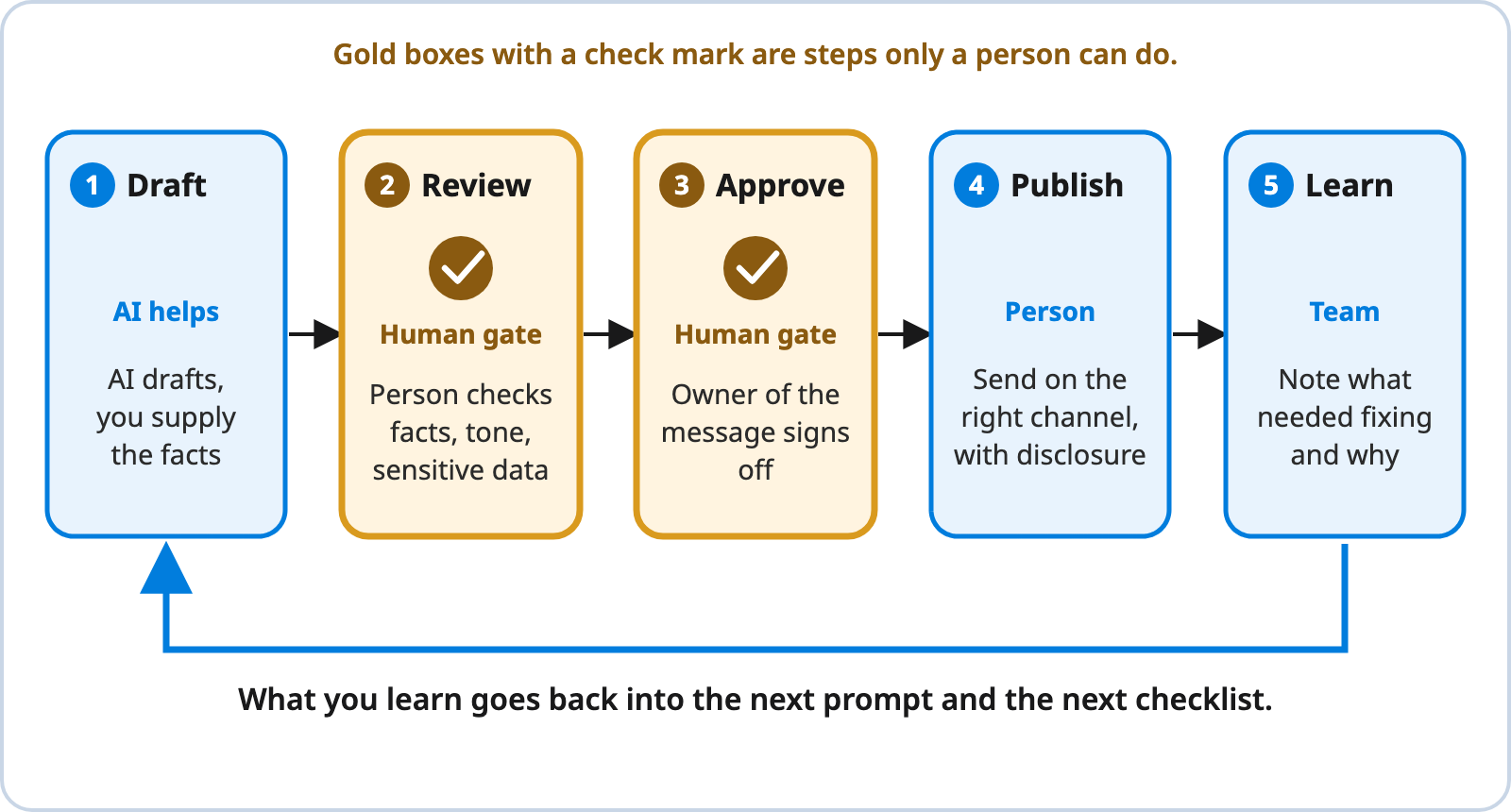
A Draft, Review, Approve, Publish and Learn Loop
Note. Created by Concrete CMS.
Text description of Figure 2
Five boxes run left to right. 1 Draft: AI drafts and you supply the facts. 2 Review (human gate): a person checks facts, tone and sensitive data. 3 Approve (human gate): the owner of the message signs off. 4 Publish: a person sends it on the right channel, with disclosure where your policy requires it. 5 Learn: the team notes what needed fixing and why. An arrow returns from Learn to Draft. The review and approve boxes are gold and carry a check mark, so they stand out without relying on color.
Keep the reviewer and the approver as separate roles where you can. The person who prompted the AI is the worst placed to spot what it left out.
Questions to ask before you use AI on a task
| Question | If yes |
|---|---|
| Does the input include personal, confidential or unannounced information? | Remove it, or stop. Use only a tool approved for that data. |
| Will readers act on the output (dates, money, benefits, safety)? | Level 1: verify every fact against the source. |
| Does the output change someone else's words? | Level 2: compare with the original, side by side. |
| Is the output a list for you, not a message for readers? | Level 3: check the findings, then decide. |
| Does your policy require disclosure for this kind of content? | Add the disclosure line before approval. |
Where to start
- Check your policy and tools. Find out which AI tools are approved and what data they may handle. If the answer is unclear, ask IT or legal before you try anything.
- Pick one Level 3 use first. Stale-content checks and theme finding produce lists, not messages, so mistakes cost less. Try the stale-content audit on one section of your intranet.
- Add one Level 1 use with a named reviewer. Announcement drafting is a good choice. Write down who reviews and who approves.
- Test and keep a change log. Ask a few employees to explain a rewritten message back to you. Note what reviewers fixed, and use it to update your prompts and checklist.
If you are weighing AI features inside an intranet platform, our guide to AI intranets and what to ask vendors covers permissions and the questions to bring to a demo (Concrete CMS, 2026a).
Talk to us
Want to talk through how this fits your organization? Schedule a demo.
References
Concrete CMS. (2024, October 9). The impact of poor communication in the workplace and how to fix it. Concrete CMS Blog. https://www.concretecms.com/about/blog/intranets/the-impact-of-poor-communication
Concrete CMS. (2026a, October 30). AI intranet: What it does and what to ask vendors. Concrete CMS Blog. https://www.concretecms.com/about/blog/ai/ai-intranet
Concrete CMS. (2026b, June 23). Internal communication tools every organization should know about. Concrete CMS Blog. https://www.concretecms.com/about/blog/intranets/internal-communication-tools
Concrete CMS. (2026c, May 7). Stop giving AI instructions. Start giving it interviews.. Concrete CMS Blog. https://www.concretecms.com/about/blog/ai/stop-giving-ai-instructions-start-giving-it-interviews
Concrete CMS. (2026d, July 1). Using AI to audit your intranet for stale content. Concrete CMS Blog. https://www.concretecms.com/about/blog/ai/using-ai-to-audit-your-intranet-for-stale-content
Concrete CMS. (2026e, March 11). Why AI training must be mandatory (and how to do it without creating chaos). Concrete CMS Blog. https://www.concretecms.com/about/blog/ai/why-ai-training-must-be-mandatory
National Institute of Standards and Technology. (2024). Artificial intelligence risk management framework: Generative artificial intelligence profile (NIST AI 600-1). U.S. Department of Commerce. https://doi.org/10.6028/NIST.AI.600-1
OWASP Foundation. (2025). LLM02:2025 sensitive information disclosure. OWASP Gen AI Security Project. https://genai.owasp.org/llmrisk/llm022025-sensitive-information-disclosure/
U.S. General Services Administration. (n.d.-a). Principles of plain language. Digital.gov. https://digital.gov/guides/plain-language/principles
U.S. General Services Administration. (n.d.-b). Test for understanding. Digital.gov. https://digital.gov/guides/plain-language/test
U.S. General Services Administration. (n.d.-c). Writing for understanding. Digital.gov. https://digital.gov/guides/plain-language/writing
World Wide Web Consortium. (n.d.). Images tutorial. Web Accessibility Initiative. https://www.w3.org/WAI/tutorials/images/